
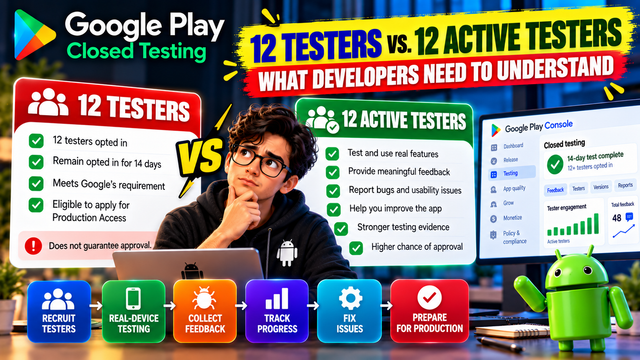
12 testers or 12 active testers? Learn what Google Play actually requires, why tester engagement matters, and how to prepare your closed test for Production Access.
If you're preparing an Android app for Google Play Production Access, you've probably heard the phrase:
“You need 12 active testers for 14 days.”
But there is an important distinction developers need to understand.
Google's official requirement for eligible personal developer accounts created after November 13, 2023 is that a closed test must have at least 12 testers continuously opted in for at least 14 days before you can apply for Production Access.
However, simply reaching the number 12 doesn't mean your testing campaign is automatically considered successful.
Google also evaluates the testing process and can require additional testing when tester engagement is insufficient.
So what does this actually mean?
Let's break it down.
What Does “12 Testers” Actually Mean?
The first thing to understand is the official requirement.
For applicable new personal developer accounts, Google requires:
At least 12 testers
Testers must be opted into the closed test
They must remain continuously opted in
The testing period must cover at least 14 consecutive days
Once these conditions are met, you can apply for Production Access
This is the basic eligibility requirement.
But eligibility isn't the same as approval.
Think of it like this:
12 testers + 14 days = Eligible to apply
Not:
12 testers + 14 days = Guaranteed Production Access
Then What Does “12 Active Testers” Mean?
This is where things become confusing.
Google's official documentation does not define a separate rule saying:
“Exactly 12 testers must open the app every day for 14 days.”
Instead, Google talks about tester engagement as part of the Production Access review.
The Production Access process asks questions about your closed test, including how you recruited testers, how they engaged with the app, what features they used, and what feedback you received.
Google may also require additional testing if it determines that tester engagement was insufficient.
So when developers say “active testers,” they're generally referring to testers who are genuinely participating in the testing process rather than simply being added to the tester list.
12 Opted-In Testers vs. Engaged Testers
Here's the easiest way to understand the difference.
Group A: 12 Opted-In Testers
You have:
12 testers
All joined the closed test
They remain opted in
The 14-day period is completed
But most of them barely interact with the app.
Group B: 12 Engaged Testers
You have:
12+ testers
They remain opted in
They actually test the app
They explore important features
They report bugs or usability problems
They provide feedback
They help you identify improvements
You make meaningful changes based on what you learn
Group B gives you a much stronger testing story.
The key isn't simply having people listed as testers.
It's being able to demonstrate that the closed test was actually useful.
Does Every Tester Need to Open the App Every Day?
This is one of the most common misconceptions.
Google's official published requirement says testers must be continuously opted in for at least 14 days. It does not separately state that every tester must open the app every single day as a hard requirement.
That doesn't mean tester activity is irrelevant.
Quite the opposite.
Google specifically considers tester engagement and can require additional testing when engagement is insufficient.
So don't focus only on creating a calendar where every tester opens the app once per day.
Instead, focus on meaningful testing.
What Does Meaningful Tester Engagement Look Like?
Imagine you're testing a food-delivery app.
A tester joins your closed test.
Simply installing the app isn't particularly useful.
A stronger test might involve:
Step 1: Create an account
Step 2: Browse restaurants
Step 3: Search for a product
Step 4: Add an item to the cart
Step 5: Review the order
Step 6: Complete the available checkout flow
Step 7: Check order history
Step 8: Test notifications
Step 9: Report anything confusing or broken
That's meaningful engagement.
Your testers are interacting with the actual user journey.
Google Wants to Know What Happened During Testing
Production Access isn't simply a checkbox exercise.
When you apply, Google asks questions about your testing process and production readiness.
You should be able to explain:
How did you recruit testers?
For example:
“We recruited testers through our existing Android user community and provided them with instructions for joining the closed test.”
What did testers do?
“Testers were asked to complete the primary user journey and explore the application's main features.”
What feedback did you receive?
“Testers identified confusion during onboarding and reported an issue with notification behavior.”
What did you change?
“We simplified the onboarding flow and corrected the notification issue.”
Did you retest?
“Testers verified the updated experience after the changes were released.”
Your answers should reflect what actually happened during your test.
Why Having Exactly 12 Testers Can Be Risky
Technically, 12 is the minimum specified requirement.
But operationally, relying on exactly 12 people can create problems.
Suppose you have:
12 testers
Then one person:
Opts out
Loses access
Changes their Google account
Stops participating
Encounters an issue with the testing link
You may suddenly fall below the minimum.
That's why many developers prefer to recruit more than the minimum.
For example:
12 required → 15–20 testers invited
This gives you some breathing room.
However, recruiting extra testers doesn't replace genuine engagement.
20 inactive testers are not automatically better than 12 genuinely engaged testers.
Need help managing your tester group?
If recruiting and coordinating testers is becoming difficult, inTesters provides a structured workflow for Android app testing, tester management, testing progress, and feedback collection.
The goal should still be genuine testing—not simply increasing the number on your tester list.
The Difference Between Quantity and Quality
Think about your testing campaign as having two dimensions.
Testing Factor
Weak Approach
Strong Approach
Tester count
Exactly 12
12+ with some buffer
Opt-in
Added but not monitored
Continuously monitored
App usage
Minimal
Meaningful
Feature testing
Random
Planned
Feedback
Little or none
Specific and actionable
Bug fixing
Ignored
Prioritized
Retesting
Rare
Done after important fixes
Documentation
Minimal
Testing process recorded
Production readiness
Assumed
Demonstrated
The strongest testing campaign isn't necessarily the one with the largest tester count.
It's the one where you can clearly explain what was tested, what was learned, and what improved.
What Should You Ask Your Testers to Do?
Don't simply send someone the opt-in link and say:
“Please install my app.”
Give testers a short testing plan.
For example:
Tester Instructions
1. Install the app through Google Play.
2. Complete the onboarding process.
3. Try the main feature.
4. Explore other important features.
5. Try the app under normal real-world conditions.
6. Report anything that doesn't work.
7. Tell us what was confusing or difficult.
8. Share suggestions for improvement.
This gives testers direction without trying to manufacture artificial activity.
Don't Ask Testers to Fake Activity
This is important.
Your goal shouldn't be:
“Open the app 10 times so Google sees activity.”
Instead, your goal should be:
“Use the app as a real user would and tell us what works and what doesn't.”
If your app is a fitness application, testers should actually try workouts.
If it's an education app, they should complete lessons.
If it's a finance app, they should explore the relevant workflows using safe test data.
If it's a productivity app, they should create tasks, edit them, complete them, and explore the important features.
Realistic usage creates useful feedback.
Test the Core User Journey
One of the best ways to improve tester engagement is to give testers specific tasks.
For example:
E-commerce app
Browse → Search → Product → Cart → Checkout
Social app
Sign up → Profile → Discover → Post → Interact
Fitness app
Sign up → Select workout → Start workout → Complete → View progress
Education app
Sign up → Course → Lesson → Quiz → Progress
Your testers don't need to randomly tap every button.
They need to understand and test the workflows that matter most.
What If Testers Only Install the App?
Installation alone shouldn't be your testing strategy.
Suppose you have 12 testers.
All 12 opt in.
All 12 install the app.
But only 2 testers actually use the main features.
You have technically built a tester group, but your testing evidence may be weak.
Google can require additional testing when tester engagement is insufficient.
That's why you should encourage testers to actually experience the application and provide useful feedback.
What If Some Testers Are More Active Than Others?
That's normal.
You don't need every tester to behave identically.
Some testers may:
Test once and provide detailed feedback
Test several features
Find a major bug
Test every update
Use the app occasionally
The important thing is that your overall testing process produces meaningful information about the app.
Don't create artificial claims about tester activity.
Document what actually happened.
Keep a Simple Testing Record
You don't need a complicated system.
A simple spreadsheet can be enough.
Tester
Features Tested
Feedback
Issue Found
Retested
Tester 1
Login, Dashboard
Login confusing
Yes
Yes
Tester 2
Search, Details
Search slow
Yes
Yes
Tester 3
Profile, Settings
No major issue
No
—
Tester 4
Main workflow
Checkout error
Yes
Yes
Managing this information manually can become difficult as your tester group grows.
inTesters can help organize tester management, testing progress, real-device testing, and feedback in a more structured workflow.
Whether you use a dedicated platform or your own spreadsheet, the important thing is to maintain an accurate record of what happened during testing.
Use Feedback to Improve the App
Testing shouldn't stop at collecting comments.
Use the cycle:
Test → Feedback → Fix → Update → Retest
For example:
Tester feedback
“The registration button isn't obvious.”
Developer action
Move the button and improve the onboarding instructions.
Updated build
Release the change in closed testing.
Retest
Ask testers to complete registration again.
Result
The new flow is easier to understand.
That's a real testing story.
Don't Confuse “Active Testers” With a New Official Requirement
This distinction is worth repeating.
Google's official documentation states that at least 12 testers must be continuously opted in for at least 14 days.
Google also considers tester engagement and can require additional testing when engagement isn't sufficient.
But Google does not publish a separate formula such as:
“12 testers must open the app every day.”
So be careful when reading third-party advice.
The safest strategy is to satisfy the official requirement while also running a genuine, well-documented testing campaign.
What Happens If Google Says More Testing Is Required?
Don't panic.
It doesn't necessarily mean your app is permanently rejected.
Google may ask you to continue the closed test if it determines that additional testing is necessary. Insufficient tester engagement is one possible reason.
Use the additional time productively.
Review
What did testers actually do?
Identify
What features need more testing?
Improve
What issues can you fix?
Update
Release improvements through closed testing.
Retest
Ask testers to verify the changes.
Document
Record what you learned.
Then prepare your Production Access application again when the app is genuinely ready.
How to Build a Strong 14-Day Testing Campaign
Here's a simple approach.
Before Day 1
Prepare:
Test build
Tester list
Testing instructions
Feedback channel
Core feature checklist
Days 1–3
Focus on:
Installation
Sign-up
Login
Onboarding
Core functionality
Days 4–7
Focus on:
Important features
Navigation
Usability
Different user scenarios
Days 8–10
Focus on:
Issues discovered earlier
Updated builds
Retesting
Edge cases
Days 11–13
Focus on:
Core user journey
Stability
Important integrations
Remaining feedback
Day 14+
Review:
Tester status
Feedback
Bugs
Fixes
Retesting
Production readiness
Then prepare your Production Access application.
Need Help Managing Your Closed Testing?
Finding 12+ reliable testers and keeping the testing process organized for 14 days can be challenging, especially for solo developers.
inTesters — Google Play Testing Platform offers a structured approach to Android app testing, including tester management, real-device testing, testing progress, and feedback collection.
This can help reduce the administrative work involved in coordinating testers and keeping track of the testing campaign.
However, a testing platform should support genuine testing rather than simply being used to satisfy a number requirement.
The goal is to collect useful feedback, identify problems, improve the app, and demonstrate genuine production readiness.
A Practical Formula to Remember
Don't think about your testing like this:
12 testers = Done
Think about it like this:
**12+ testers
Continuous opt-in
14-day requirement
Meaningful engagement
Useful feedback
Bug fixing
Retesting
= Stronger Production Access application**
The first part helps you meet the eligibility requirement.
The rest helps you demonstrate that the testing actually mattered.
Final Checklist
Before applying for Production Access, ask yourself:
Tester Requirement
☐ Do I have at least 12 testers?
☐ Have they remained continuously opted in for the required period?
Tester Engagement
☐ Did testers actually use the app?
☐ Did they test important features?
☐ Did they experience the core user journey?
Feedback
☐ Did I collect meaningful feedback?
☐ Did I identify important issues?
☐ Did I fix significant problems?
☐ Did I retest important fixes?
Production Readiness
☐ Is the current build stable?
☐ Have I reviewed the core workflows?
☐ Have I checked my Play Console setup?
☐ Can I honestly explain what happened during testing?
☐ Can I explain why the app is ready for production?
If you can answer these questions confidently, you're in a much better position than someone who simply added 12 people to a tester list.
Frequently Asked Questions
1.Is 12 testers the official Google Play requirement?
For applicable new personal developer accounts, Google requires at least 12 testers to remain continuously opted in to the closed test for at least 14 days before applying for Production Access.
2.Does Google officially require 12 testers to open the app every day?
Google's published requirement does not specify a separate daily-opening rule. However, Google does evaluate tester engagement and may require additional testing if engagement is insufficient.
3.Is having 12 testers enough to get Production Access?
No. Meeting the testing requirement makes you eligible to apply. Google reviews the application and may require additional testing.
4.Should I recruit more than 12 testers?
It can be practical to have some buffer above the minimum, because testers can opt out or encounter access issues. However, additional tester count does not replace meaningful engagement.
5.What should testers actually do?
They should use the app realistically, explore important features, complete core workflows, identify problems, and provide useful feedback.
6.What if Google asks me to test for longer?
Continue the closed test, improve the app based on feedback, and gather stronger evidence of tester engagement and production readiness.
Conclusion
The biggest mistake developers make is treating “12 testers” as the entire goal.
It's not.
The official requirement is about having at least 12 testers continuously opted in for 14 days before you can apply for Production Access. But Google also considers tester engagement and can require additional testing when engagement isn't sufficient.
So don't build a testing campaign around numbers alone.
Build it around real users, real workflows, real feedback, and real improvements.
Remember:
12 testers gets you to the starting line.
Meaningful testing helps you make the case that your app is ready for production.
If you need help organizing testers, real-device testing, progress, and feedback, inTesters can be incorporated into your testing workflow.
The goal isn't simply to ask:
“Do I have 12 testers?”
Ask:
“What did my testers actually learn about my app?”
That's the difference between having testers and actually testing your app.
About the Author

Saksham Goyal
Expert software tester and contributor to the community. Passionate about AI, automation, and user experience.