
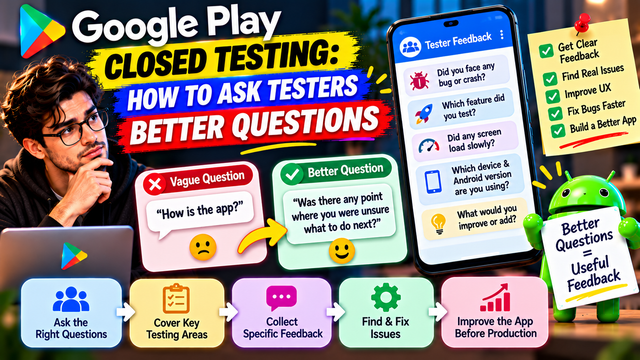
Learn how to ask better questions during Google Play Closed Testing to collect useful tester feedback about bugs, UX, performance, devices, features, and app improvements.
Getting testers for your Google Play Closed Test is one thing.
Getting useful feedback from them is another.
Ask a tester, “How is the app?” and you may receive:
“Good.”
That technically qualifies as feedback. It is also approximately as useful as asking a weather app whether it feels emotionally supported.
Good tester questions should help you discover bugs, usability problems, confusing experiences, missing features, performance issues, and real-world problems.
Google recommends giving testers clear instructions, specifying the type of feedback you want, encouraging them to use as many features as possible, and providing a clear feedback channel.
This guide explains how to ask better questions throughout your closed test.
Why Better Questions Matter
Testers do not automatically know what information developers need.
A tester might notice:
A button feels confusing
A page loads slowly
Login sometimes fails
A notification arrives late
A feature is difficult to find
The app behaves differently on mobile data
A screen looks different on another device
A workflow requires too many steps
But unless you ask the right question, they may never mention it.
Compare:
Weak question:
Did you like the app?
Better question:
Was there any point where you were unsure what to do next?
The second question gives the tester something specific to think about.
1. Start With Questions About Installation
Before asking about advanced features, make sure testers can actually get into the app.
Ask:
Were you able to open the testing link?
Were you able to opt in successfully?
Did the app install without problems?
Did you encounter any error during installation?
Did the app open normally after installation?
Did you have to try anything more than once?
Example
Installation Check:
Were you able to opt in and install the app successfully? If not, please tell us what happened and share a screenshot if possible.
This can reveal problems before the tester even reaches your main features.
2. Ask About the First-Time Experience
The first few minutes matter.
Ask testers to behave like someone who has never seen the app before.
Useful questions include:
Was it obvious what the app does?
Did you understand what to do first?
Was anything confusing during onboarding?
Could you find the main feature easily?
Did you understand the instructions?
Was there anything you expected to see but couldn't find?
Better question
Instead of:
Was onboarding good?
Ask:
What was the first thing that confused you during onboarding?
Specific questions encourage specific answers.
3. Ask One Question at a Time
Avoid sending testers a giant paragraph containing twelve questions.
For example:
Was signup easy, were the buttons clear, did the OTP work, was the screen fast, did you understand the instructions, and did you like the design?
That is several different questions wearing a trench coat.
Separate them.
Better format
Signup:
Was account creation easy?
OTP:
Did the verification code arrive correctly?
Navigation:
Could you easily find the next step?
Performance:
Did any screen take unusually long to load?
Design:
Was anything visually confusing?
This makes the responses easier to interpret.
4. Ask Questions About Specific Features
Google recommends encouraging testers to use as many available features as possible so the feedback represents a more complete test.
Create feature-specific questions.
For a shopping app
Could you search for a product?
Were product details easy to understand?
Could you add an item to the cart?
Was checkout easy to complete?
Did the payment process behave correctly?
For a fitness app
Could you start a workout?
Were exercise instructions clear?
Did progress tracking work?
Were notifications received correctly?
For a productivity app
Could you create a task?
Could you edit and delete it?
Did reminders work?
Was it easy to find completed tasks?
The exact questions should reflect what your app actually does.
5. Ask "What Went Wrong?" Instead of "Did You Find Bugs?"
Testers may not consider something a bug.
A screen freezing for five seconds might be described as:
“It was a little slow.”
A developer may consider that important.
Instead of asking:
Did you find any bugs?
Try:
Did anything behave differently from what you expected?
Or:
Was there any moment when the app did not respond the way you expected?
These questions uncover problems without requiring testers to understand software terminology.
6. Ask About Confusing Moments
Some of the most valuable feedback is not a crash.
It is confusion.
Ask:
Was there any screen you did not understand?
Did you ever wonder what to tap next?
Was any button unclear?
Did you expect something to happen but it didn't?
Was any information difficult to find?
Did any wording confuse you?
These questions are particularly useful for discovering UX problems.
7. Ask About Real-World Usage
Google's Production Access questions ask whether tester usage matched expected production user behavior and whether there were differences.
So don't limit testing to:
"Open the app and check every button."
Ask testers to use the app naturally.
For example:
Imagine you downloaded this app for the first time today. What would you normally do first?
Then ask:
Did the app support that workflow?
Did anything slow you down?
Did you need help?
Did you abandon any task?
What would you expect to happen next?
This can reveal problems that a simple checklist misses.
8. Ask About Performance
Users notice performance even when they don't call it a performance issue.
Ask:
Did any screen load slowly?
Did the app freeze?
Did scrolling feel smooth?
Did the app become slow after extended use?
Did anything take unusually long?
Did the app become unresponsive?
Instead of:
Is performance good?
Ask:
Which part of the app felt slowest?
That answer is much more actionable.
9. Ask About Crashes and Errors
Use direct questions:
Did the app crash at any point?
What were you doing immediately before the crash?
Did the problem happen once or repeatedly?
Were you able to reproduce it?
Did restarting the app solve the problem?
Did you see an error message?
Ask testers to provide:
Device
Android version
App version
Feature
Steps to reproduce
Screenshot or recording
Example
Did the app crash while using any feature? If yes, tell us what you were doing immediately before the crash and which device you were using.
10. Ask About Different Devices
If your tester group uses different Android phones, ask:
Did the app display correctly on your device?
Did any buttons or text appear incorrectly?
Did the app behave differently from other devices?
Did rotation work correctly?
Did the keyboard cover anything?
Did the app feel unusually slow?
This can help identify device-specific issues.
11. Ask About Network Conditions
Your app might work perfectly on fast Wi-Fi and become a confused potato on mobile data.
Ask:
Did the app work correctly on mobile data?
Did anything fail when the connection was slow?
What happened when the connection was temporarily interrupted?
Did the app recover after reconnecting?
Were loading or error messages understandable?
For apps heavily dependent on network connectivity, this can be especially valuable.
12. Ask About Notifications
Notifications often work during development and then behave strangely in real-world use.
Ask:
Did you receive notifications?
Were they delivered on time?
Did tapping a notification open the correct screen?
Did you receive duplicate notifications?
Did notifications still work after the app was closed?
These questions turn "notifications work" into an actual test.
13. Ask About Login, Signup and Recovery
Authentication deserves its own questions.
Signup
Could you create an account successfully?
Was the process easy to understand?
Login
Could you log in successfully?
Did you encounter an error?
OTP
Did the OTP arrive?
Did it arrive quickly enough?
Did entering the OTP work?
Password recovery
Could you reset your password?
Did the reset process make sense?
These are common points of failure and should not be treated as one giant "login works" checkbox.
14. Ask Testers to Compare Expectations With Reality
One powerful question is:
What did you expect to happen, and what actually happened?
This is especially useful when investigating UX issues.
Example
Expected:
Tapping "Save" should return the user to the profile.
Actual:
The button appeared to do nothing.
This distinction helps developers reproduce the problem.
15. Ask Testers What They Would Change
Once testers have used the app, ask:
What would you improve first?
Which part feels unnecessary?
Which feature should be easier to use?
Is anything missing?
What would make you use this app more often?
Not every suggestion should become a development task.
The purpose is to identify patterns.
If five testers independently complain about the same workflow, that deserves attention.
16. Ask Questions at Different Stages
Don't ask the same questions every day.
Use different questions throughout the testing period.
Days 1–2: First Experience
Could you install the app?
Was onboarding clear?
Did you understand the app's purpose?
Days 3–5: Core Features
Which feature did you use?
Did the main workflow work correctly?
Did anything behave unexpectedly?
Days 6–8: Deeper Testing
Which feature was hardest to use?
Did you find anything confusing?
Did you notice performance issues?
Days 9–11: Real-World Use
Did you use the app naturally?
Did anything interrupt your workflow?
Did you encounter problems outside the main feature?
Days 12–14: Final Review
What should we fix before production?
Which issue affected your experience most?
What improved after the latest update?
Would you use the app again?
What is the one thing you would change?
This produces feedback across the entire testing experience rather than one snapshot.
17. Use Open-Ended Questions Carefully
Open-ended questions can produce valuable insights.
Examples:
What was the most confusing part of the app?
What did you like most?
What would you change?
Was there anything you expected the app to do differently?
But don't make every question open-ended.
A good feedback form combines:
Specific question + short answer + optional explanation
For example:
Did you experience any loading issues?
Yes / No
If yes:
Which screen was affected?
That is much easier to analyze.
18. Ask Follow-Up Questions
When a tester says:
"The app is slow."
Don't stop there.
Ask:
Which screen felt slow?
Then:
Approximately how long did it take?
Then:
Were you using Wi-Fi or mobile data?
Then:
Which device and Android version were you using?
You have now transformed:
"It's slow."
into:
"The dashboard takes approximately 7–8 seconds to load on a Samsung Galaxy A55 running Android 15 over mobile data."
That is feedback a developer can actually work with.
19. Don't Lead Testers Toward the Answer
Avoid questions like:
The new design is much better, right?
That encourages agreement rather than honesty.
Instead ask:
How does the new design compare with the previous version?
Or:
What do you think about the new design?
The goal is genuine feedback, not compliments.
20. Don't Ask Testers to Pretend
Your questions should encourage genuine usage.
Avoid:
"Please open the app every day and click every feature."
unless those actions genuinely represent how your app is expected to be used.
Instead:
"Please use the features that are relevant to you and report anything that doesn't work as expected."
The quality of feedback matters more than creating artificial activity.
21. Create a Tester Question Bank
Keep a reusable list of questions.
Installation
Were you able to install the app?
Did you encounter any installation issue?
UX
Was anything confusing?
Did you know what to do next?
Features
Did the main feature work as expected?
Which feature did you use most?
Performance
Did anything feel slow?
Did the app freeze?
Reliability
Did the app crash?
Did any feature stop responding?
Device
Which device did you use?
Did anything look different on your device?
Network
Did the app behave correctly on mobile data?
What happened when the connection was interrupted?
Feedback
What would you improve first?
What did you like?
What frustrated you?
22. Turn Feedback Into a Tracking System
Don't simply collect answers and forget them.
Create categories:
Category
Example
Installation
Tester cannot install
Login
OTP not received
UX
Navigation confusing
Performance
Dashboard loads slowly
Crash
App closes during checkout
Device
Layout broken on small screen
Network
Feature fails on mobile data
Suggestion
Add dark mode
Then track:
Question → Feedback → Issue → Priority → Fix → Retest
23. The Best Questions Are Connected to Actions
A useful question should ideally lead to one of three outcomes:
Keep
The feature works well.
Investigate
The feedback reveals a possible problem.
Improve
The feedback identifies a change worth making.
For example:
"Was the checkout process easy to complete?"
If several testers answer No, you investigate.
If they repeatedly mention the same step, you improve it.
Then you release an update and ask them to retest.
That creates the full testing loop:
Ask → Observe → Record → Fix → Update → Retest
24. Example Tester Questionnaire
You can send this directly to testers after they have used the app.
General Experience
Was the app easy to understand?
What did you use the app for?
Was anything confusing?
Core Features
Did the main feature work as expected?
Which feature did you find most useful?
Was any feature difficult to use?
Bugs
Did the app crash or freeze?
Did any button or feature fail?
Did you see any error message?
Performance
Did any screen load slowly?
Did the app become slower during use?
Device & Network
Which device and Android version did you use?
Did anything look or behave differently on your device?
Did the app work correctly on your network?
Improvements
What would you improve first?
Was anything missing?
Would you use the app again? Why or why not?
This gives you a much richer picture than simply asking:
"Any feedback?"
Common Mistakes When Asking Testers Questions
1. Asking "Is everything okay?"
Too broad.
2. Asking only yes/no questions
You may miss important details.
3. Asking too many questions at once
Testers stop reading.
4. Leading the tester
You want honest feedback, not applause.
5. Using technical language
Testers don't need to know your internal terminology.
6. Asking questions unrelated to the app
Keep the feedback focused.
7. Never following up
A vague answer often contains a useful problem hiding underneath.
8. Ignoring repeated feedback
Repeated complaints are often more valuable than isolated comments.
9. Collecting feedback without acting on it
Feedback should influence testing and development.
10. Writing unsupported Production Access answers
Your Production Access answers should accurately reflect what happened during your test.
A Simple Formula for Better Tester Questions
Use this formula:
Feature + Situation + Expected Result + Problem
For example:
When using checkout on mobile data, did the payment page load normally? If not, what happened?
Or:
When editing your profile, could you save the changes successfully? If not, what happened after tapping Save?
This gives testers enough context to provide useful information.
Final Checklist
Before sending questions to your testers, check:
Is the question specific?
Is it easy to understand?
Does it relate to something they actually tested?
Does it avoid leading the tester?
Can the answer lead to an action?
Have you asked about unexpected behavior?
Have you included device information where relevant?
Have you asked about performance where relevant?
Have you included open-ended questions?
Do you have a way to record the answers?
Will you follow up on important responses?
Will you use recurring feedback to prioritize improvements?
Conclusion
Better tester feedback starts with better questions.
Instead of asking:
"Did you like the app?"
ask:
"What was the most confusing part of the app?"
Instead of:
"Any bugs?"
ask:
"Did anything behave differently from what you expected?"
Instead of:
"Is the app fast?"
ask:
"Which screen felt slowest?"
The goal is not to make testers write essays.
The goal is to make it easy for them to tell you what happened, where it happened, what they expected, and what should improve.
For eligible new personal developer accounts, Google requires at least 12 testers to remain continuously opted in for 14 days before applying for Production Access. Google also evaluates tester engagement and asks developers to summarize feedback and explain changes made based on the closed test.
So build your feedback process around a simple loop:
Ask better questions → collect useful feedback → identify patterns → fix problems → retest → document what changed.
That is how a closed test becomes an actual product-improvement process instead of 14 days of people politely saying, "Looks good."
FAQs
1.What should I ask Google Play testers?
Ask about installation, onboarding, core features, unexpected behavior, crashes, performance, usability, device compatibility, network conditions, and improvements.
2.How often should I ask testers for feedback?
There is no official requirement for a particular number of questions or messages. A practical approach is to ask different questions at different stages of testing rather than repeatedly sending the same questionnaire.
3.Should tester questions be open-ended?
Use a combination. Specific questions are easier to analyze, while open-ended questions can reveal problems you didn't anticipate.
4.Should I ask testers about bugs?
Yes, but don't ask only "Did you find any bugs?" Ask about unexpected behavior, crashes, freezes, slow screens, failed actions, and confusing workflows.
5.Can tester feedback help with Production Access?
Yes. Google asks developers applying for Production Access to summarize feedback received and explain how feedback was collected. It also asks what changes were made based on the closed test and how the developer determined the app was ready for production.
6.Where can I collect Google Play tester feedback?
You can provide a feedback URL or email address on the testing setup, and testers can also submit private feedback through Google Play. Google recommends having a clear feedback channel.
7.Do testers need to use every feature?
Google recommends encouraging testers to use as many available features as possible to provide holistic feedback. The exact testing tasks should depend on your app.
About the Author

Saksham Goyal
Expert software tester and contributor to the community. Passionate about AI, automation, and user experience.