
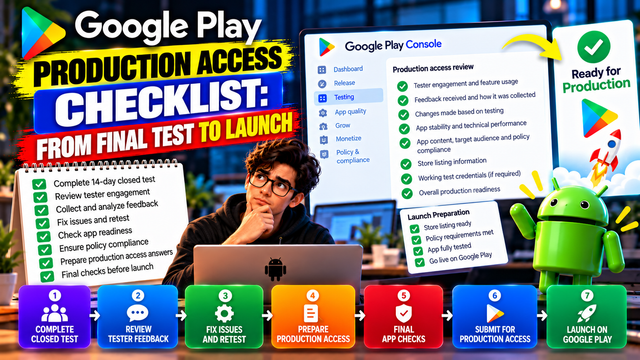
Follow this Google Play Production Access checklist to move from your final 14-day Closed Test through tester review, app readiness, Production Access, and launch.
Your 14-day Closed Test is finally complete.
You have the testers. You have completed the testing period. You have collected feedback, fixed issues, and hopefully resisted the urge to launch before checking everything twice.
Now comes the next important step: Google Play Production Access.
For personal developer accounts created after November 13, 2023, Google requires a Closed Test with at least 12 testers continuously opted in for at least 14 days before you can apply for Production Access. Completing those requirements makes you eligible to apply, but it does not guarantee approval. Google reviews your testing process, app information, and production readiness before granting access.
This checklist takes you from the final days of testing through your Production Access application and toward launch.
What Is Production Access?
Production Access is the step that allows an eligible app to move from testing toward public distribution on Google Play.
After completing the required Closed Test, you can apply from the Play Console Dashboard.
Google's Production Access application contains three sections:
About your closed test
About your app or game
About your production readiness
Each section gives Google additional context about your app and your testing process.
So don't treat the application like a box-ticking exercise.
Phase 1: Confirm Your Closed Test Is Actually Complete
Before applying, verify the fundamentals.
Closed Testing Checklist
At least 12 testers are opted in.
The testers have remained continuously opted in for at least 14 days.
The Closed Testing release is available to testers.
Testers have had access to the app during the testing period.
Important features have been tested.
Feedback has been collected.
Major issues discovered during testing have been addressed.
Google specifically states that testers who opt out before completing the required period do not count toward the continuous 14-day requirement. If a tester opts out and later opts back in, the qualifying period must again be continuous.
Phase 2: Review Tester Engagement
Having 12 testers listed in Play Console is only one part of the process.
Google's Production Access questionnaire asks about tester engagement, including whether testers used the available features and whether their usage matched expected production behavior.
Before applying, ask yourself:
Did testers actually use the core features?
Did they follow the main user journey?
Did they encounter bugs?
Did they provide useful feedback?
Did their behavior resemble your expected users?
Did you make improvements based on what you learned?
You don't need to invent a dramatic testing story.
You need to be able to explain what actually happened.
Phase 3: Document Your Tester Feedback
Google asks you to summarize feedback received during the Closed Test and explain how that feedback was collected.
Prepare a simple record such as:
Feedback
Action Taken
Retested?
Login occasionally failed
Fixed authentication flow
Yes
Search results were confusing
Improved search logic
Yes
Dashboard loaded slowly
Optimized API calls
Yes
Notification was delayed
Updated notification handling
Yes
This gives you concrete information when completing the Production Access questionnaire.
What Makes Feedback Useful?
Useful feedback can include:
Bugs
Crashes
Confusing navigation
Slow screens
Broken workflows
UI problems
Compatibility issues
Missing functionality
Unexpected behavior
"Nice app" is lovely for morale. It is less useful for debugging.
Phase 4: Check Your Core User Journey
Before launch, test the complete experience from beginning to end.
For example:
Install → Sign Up → Onboarding → Main Feature → Save/Submit → Exit → Return → Continue Using App
Check every important step.
If your app requires authentication, verify that:
Registration works
Login works
Password recovery works
Logout works
Sessions behave correctly
Test credentials provided to Google work
If your app includes payments, subscriptions, uploads, location services, notifications, or other important functionality, test those flows as well.
Phase 5: Review Bugs and Fixes
Don't apply for Production Access while knowingly leaving major issues unresolved.
Google recommends continuing Closed Testing while resolving user-reported issues and bugs. It also recommends updating your app during testing before production when appropriate.
Create a final bug review:
Issue
Severity
Status
App crash during login
High
Fixed
Slow dashboard
Medium
Fixed
UI alignment issue
Low
Fixed
Minor text error
Low
Fixed
Payment failure
Critical
Verify before launch
Prioritize problems that affect:
Core functionality
Stability
Security
User experience
Payments
Authentication
Data handling
Policy compliance
Phase 6: Review App Stability
Before launch, check the technical health of your app.
Look for:
Crashes
ANRs
Slow startup
Broken screens
Failed API requests
Memory problems
Device-specific issues
Sign-in problems
Notification failures
Your app doesn't need to be magically flawless. Software is software, and apparently it enjoys discovering new ways to misbehave five minutes before launch.
But serious issues should be addressed before you expose the app to a much larger audience.
Phase 7: Review Your Play Console App Setup
Before submitting Production Access, review the information attached to your app.
Check:
App name
App icon
Screenshots
Short description
Full description
Category
App content
Target audience
Content rating
Data Safety information
Privacy policy
Permissions
App access instructions
Pricing and distribution
Countries or regions
Make sure the information accurately represents the current version of your app.
Do not leave outdated screenshots or descriptions from an earlier build simply because nobody complained about them yet.
Phase 8: Review Policy Compliance
Google makes it clear that developers are responsible for ensuring their apps comply with Google Play Developer Program Policies before applying. Google also states that production review is not a troubleshooting step.
That means you should review policy-related areas before submitting.
Pay particular attention to:
User data
Privacy
Permissions
Ads
Subscriptions
Financial features
Health-related functionality
Children's content
Intellectual property
Misleading claims
Restricted content
If your app needs special disclosures or declarations, make sure those are complete.
Phase 9: Prepare Your Production Access Answers
This is one of the most important steps.
Google asks questions across three areas.
Section 1: About Your Closed Test
You may need to explain:
How easy it was to recruit testers
How testers engaged with the app
Whether they used available features
Whether their behavior matched expected production users
What feedback you received
How you collected feedback
Section 2: About Your App
You need to provide information such as:
Target audience
App or game value proposition
Estimated first-year install range
Section 3: About Production Readiness
You need to explain:
What changes you made based on Closed Testing
How you determined that the app was ready for production
Example of a Stronger Production Readiness Answer
Instead of:
"We tested the app for 14 days and it is ready."
Explain the actual process:
"During the Closed Test, testers evaluated the main user journey and key application features. We collected feedback through direct tester communication and identified issues with onboarding, search, and notification behavior. We addressed the relevant issues and asked testers to repeat the affected workflows after the fixes. We also reviewed app stability and the overall user experience. Based on the testing results and improvements made during the test, we determined that the app was ready for production."
The important thing is that the answer should describe your actual experience. Do not copy an example and pretend it happened.
Phase 10: Keep Testing While You Prepare
Finishing Day 14 does not mean you should immediately stop testing.
Google recommends continuing Closed Testing while resolving user-reported issues and bugs.
If you are still fixing important problems, keep testing.
A useful final sequence is:
Final Testing → Review Feedback → Fix Issues → Retest → Check Policies → Prepare Answers → Apply
That is far safer than:
Day 14 → Panic → Apply
Phase 11: Make Sure Your Testers Are Still There
Before applying, verify your tester status again.
The requirement is at least 12 testers continuously opted in for the preceding 14 days when applying for Production Access.
Don't assume that because Play Console showed 12 testers yesterday, everything is still fine today.
Check before submitting.
If maintaining a reliable tester group is becoming difficult, a dedicated testing platform can make the process easier to manage.
inTesters provides Android app testing options focused on Google Play Closed Testing, including tester coordination and managed testing services. These are inTesters' own services and are not a guarantee of Google's Production Access decision.
You can also review inTesters' guide to getting 12 testers for 14 days for additional information about organizing a Closed Test.
Phase 12: Submit Your Production Access Application
Once your testing and app preparation are complete:
Open Google Play Console.
Go to your app's Dashboard.
Select Apply for production.
Complete the Closed Test section.
Complete the App/Game section.
Complete the Production Readiness section.
Review your answers.
Submit the application.
Read your answers carefully before submitting.
Make sure they are:
Honest
Specific
Consistent with your actual testing
Based on real feedback
Focused on what you learned
Clear about the improvements you made
Phase 13: What Happens After You Apply?
After submission, Google reviews your application.
Google says the review usually takes seven days or less, although it can occasionally take longer. The account owner receives an email notification when the review is complete.
There are two broad outcomes.
Production Access Granted
You can proceed with your production release.
Before launching publicly, perform one final check of your:
App bundle
Store listing
Pricing
Countries
App content
Data Safety information
Privacy policy
Release configuration
More Testing Required
Google may require continued testing.
Google specifically identifies fewer than 12 opted-in testers and insufficient tester engagement as reasons additional testing may be required.
If this happens, don't simply repeat the same 14-day process without learning anything.
Review:
Tester engagement
Feature usage
Feedback
Bugs
Fixes
Retesting
Production readiness
Your questionnaire answers
Then strengthen the areas that need improvement.
Final Google Play Production Access Checklist
Tester Requirements
At least 12 testers are continuously opted in.
The required 14-day period has been completed.
Tester participation has been monitored.
Important features have been tested.
Core user journeys have been tested.
Feedback and Improvements
Tester feedback has been collected.
Important issues have been documented.
Major bugs have been fixed.
Important fixes have been retested.
You can explain what changed because of testing.
App Quality
Core functionality works.
Login works.
Payments work, if applicable.
Notifications work, if applicable.
App stability has been reviewed.
Major crashes and ANRs have been addressed.
Important device or compatibility issues have been checked.
Play Console
Store listing is accurate.
Screenshots match the current app.
App icon is correct.
App content is complete.
Data Safety information is accurate.
Privacy policy is available where required.
Target audience information is correct.
Content rating is complete.
App access instructions work.
Production Access Application
Closed Test answers are complete.
Tester engagement is explained clearly.
Feedback collection is explained.
Target audience is accurately described.
Value proposition is clear.
Install estimate is reasonable.
Changes made during testing are explained.
Production readiness is explained honestly.
A Simple Final-Day Workflow
If your 14-day testing period has just finished, use this sequence.
Step 1: Check Tester Status
Confirm your required tester count and testing duration.
Step 2: Review Feedback
Go through the feedback collected during the Closed Test.
Step 3: Review Bugs
Identify unresolved high-impact issues.
Step 4: Retest Important Fixes
Make sure your fixes actually solved the problems.
Step 5: Review Production Readiness
Ask whether a new user could install the app today and complete the main journey successfully.
Step 6: Review Play Console
Check your listing, policies, app content, Data Safety information, and access instructions.
Step 7: Prepare Your Answers
Use your actual testing records rather than generic statements.
Step 8: Apply for Production Access
Submit once your app and answers are ready.
Step 9: Monitor the Review
Keep an eye on Play Console and the developer account email for Google's decision.
Frequently Asked Questions
Can I apply immediately after 14 days?
You can apply once you have fulfilled the Closed Testing requirement, including at least 12 continuously opted-in testers for the preceding 14 days. However, completing the requirement does not guarantee Production Access.
Does Google automatically approve my app after 14 days?
No. The 14-day Closed Test makes an eligible developer account able to apply. Google then evaluates your testing information, app, and production readiness.
What if one tester opted out during the 14 days?
That tester's period does not satisfy the continuous requirement. Google states that testers who opt out and later opt back in need a new continuous period to count toward the requirement.
Does Google require daily app usage?
Google's official documentation emphasizes continuous opt-in and tester engagement, but it does not state a universal daily app-opening requirement. Your testing should nevertheless involve genuine use of the app and its features.
How long does Production Access review take?
Google says the review usually takes seven days or less, but it can occasionally take longer.
What happens if Google asks for more testing?
Continue your Closed Test and address the areas that need improvement. Google may require additional testing when tester engagement is insufficient or the required tester participation is not maintained.
Can inTesters guarantee Production Access?
No. inTesters can provide testing services and help manage testers and testing activity, but Google's Production Access decision remains Google's.
Conclusion
Getting through 14 days of Closed Testing is an important milestone, but it is not the final launch button.
The final stage is about demonstrating that your app was genuinely tested, that you listened to testers, that important issues were addressed, and that the app is ready for real users.
The complete path looks like this:
12+ Testers → 14-Day Closed Test → Tester Engagement → Feedback → Fixes → Retesting → Production Readiness → Production Access → Launch
Take the final review seriously.
Check your testers. Review your feedback. Fix the important problems. Verify your Play Console information. Prepare specific answers. Then apply.
And if managing testers is the part making you question every life decision that led to app development in the first place, inTesters offers structured Android testing options that can help with the testing side of the process.
Production Access is Google's decision. Your job is to make the evidence for readiness as clear, accurate, and credible as possible.
About the Author

Saksham Goyal
Expert software tester and contributor to the community. Passionate about AI, automation, and user experience.