
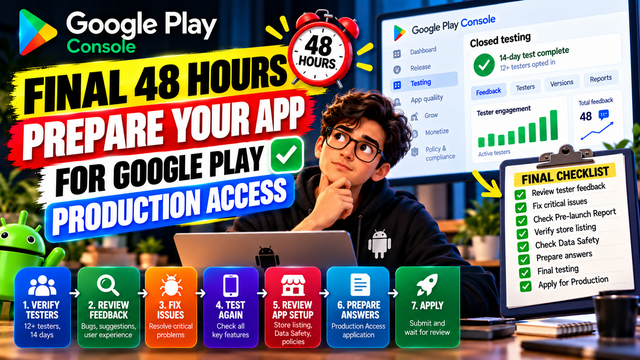
Preparing for Google Play Production Access? Use this final 48-hour checklist to review testers, feedback, bugs, Pre-launch Report, app setup, and Production Access answers.
The final 48 hours before requesting Google Play Production Access are not the time to make random changes to your app.
They are the time to verify, document, test, and fix.
For personal developer accounts created after November 13, 2023, Google Play requires a closed test with at least 12 testers continuously opted in for at least 14 days before you can apply for Production Access. Meeting that requirement makes you eligible to apply, but it does not guarantee approval. Google also evaluates tester engagement, feedback, app readiness, and your answers in the Production Access application.
So what should you do during the final 48 hours?
Use this simple approach:
Verify → Test → Fix → Document → Apply
Why the Final 48 Hours Matter
Many developers treat the end of closed testing as a countdown:
“14 days are almost over. I'll just apply.”
That's risky.
Google's Production Access application asks about:
Your closed testing process
Tester recruitment
Tester engagement
Feature usage
Expected production-user behavior
Feedback received
Your target audience
Your app's value proposition
Changes made from testing
How you determined the app was ready for production
That means your final two days should be used to make sure you can honestly and clearly explain what happened during testing.
48 Hours Before Production Access: Start With the Numbers
Before changing anything, check your Play Console.
Confirm:
You have at least 12 testers
Testers are still opted in
The required testing period has been completed or is about to be completed
Your closed testing release is active
Your latest intended build is available to testers
You haven't accidentally removed testers from the testing program
Google's current requirement is 12 testers continuously opted in for at least 14 days for eligible new personal developer accounts.
Don't apply just because the calendar says Day 14.
Make sure the testing status in Play Console supports your application.
If your tester situation is unstable, use the remaining time to stabilize it rather than rushing to apply.
48 Hours Before: Test the Core User Journey
Now use the app as a real user.
Don't randomly tap through screens.
Follow the most important journey your users are expected to complete.
For example:
Sign up → Create profile → Search → Select item → Complete action → Confirmation
Depending on your app, this could be:
Registration
Login
Search
Purchases
Payments
Content consumption
Uploading
Messaging
Notifications
Profile management
Subscriptions
Settings
Ask:
“If a new user downloaded this app tomorrow, could they complete the main task without getting stuck?”
If the answer is no, fix that before applying.
48 Hours Before: Test the Important Features
Google's guidance encourages testers to use as many features as possible so that feedback is more comprehensive.
Create a quick checklist.
Area
What to Check
Onboarding
Is the first-use experience clear?
Login
Can users sign in successfully?
Main feature
Does the primary function work?
Navigation
Can users find important screens?
Forms
Do validation and error messages work?
Notifications
Are they triggered correctly?
Payments
Does the complete flow work if applicable?
Settings
Do important settings behave correctly?
Offline/poor network
Does the app fail gracefully?
Logout
Can users safely sign out?
You don't need to test every possible scenario in 48 hours.
Focus on the features that matter most to the user.
36–48 Hours Before: Review Tester Feedback
Don't leave your tester feedback untouched.
Google provides a Testing feedback section in Play Console where you can review feedback and filter it by things such as date, language, app version, and device type. Google also recommends maintaining a record of received feedback.
Look for:
Bugs
Crashes
Freezes
Broken buttons
Failed transactions
Login problems
Incorrect results
Usability Problems
Confusing instructions
Difficult navigation
Unclear buttons
Missing confirmation messages
Complicated workflows
Performance Problems
Slow startup
Long loading times
Lag
Excessive battery usage
Network-related failures
Repeated Feedback
If multiple testers report the same problem, give it higher priority.
36 Hours Before: Fix High-Priority Issues
You don't necessarily need to implement every feature request before Production Access.
But you should address meaningful problems discovered during testing.
Use a simple priority system:
🔴 High Priority
Fix before applying if possible.
Examples:
App crashes
Login doesn't work
Core feature is broken
Payment fails
Data isn't saved
Major security or privacy problem
🟠 Medium Priority
Fix if practical.
Examples:
Confusing navigation
Poor error messages
Minor UI problems
Slow screen transitions
🟢 Low Priority
Document for future improvement.
Examples:
Cosmetic changes
Nice-to-have features
Minor design preferences
The goal isn't to make the app perfect.
The goal is to make sure important problems aren't being ignored.
30–36 Hours Before: Retest Your Fixes
This step is often forgotten.
Fixing a bug is not the same as proving the bug is fixed.
Use this cycle:
Feedback → Fix → New Build → Retest
For example:
Tester reported that checkout failed.
You fix checkout.
Then test:
Cart → Checkout → Payment → Confirmation
If possible, ask testers to verify important fixes too.
Keep a simple record:
Issue
Version Found
Fix
Version Retested
Result
Login failure
1.0.0
Updated authentication
1.0.1
Fixed
Confusing onboarding
1.0.0
Rewrote instructions
1.0.1
Improved
Missing confirmation
1.0.0
Added confirmation message
1.0.1
Fixed
This makes it much easier to explain what changed during testing.
24–30 Hours Before: Check Your Pre-Launch Report
Don't ignore Play Console's testing tools.
Google recommends using the Pre-launch report to identify technical issues before reaching production users. It can surface warnings, errors, and performance issues.
Review the report for problems such as:
Crashes
ANRs
Performance issues
Device-specific problems
Startup problems
Compatibility issues
Other test warnings
Important:
Don't automatically assume that every warning means your app cannot launch.
Instead, investigate the important findings and determine whether they affect real users or important workflows.
24 Hours Before: Verify Your App Setup
Your final day is a good time for a complete Play Console review.
Check:
Store Listing
App name
App icon
Screenshots
Short description
Full description
Category
Contact information
App Content
Review any required declarations and forms.
Data Safety
Make sure your answers accurately represent how your app handles user data.
Privacy Policy
Make sure the privacy policy is accessible and consistent with your app's actual behavior.
Permissions
Check whether the permissions requested by your app are actually necessary.
App Signing
Confirm you're using the intended signed build.
Version
Make sure the correct version/build is being prepared for production.
18–24 Hours Before: Check Your Production Build
The build you plan to release publicly deserves one final test.
Don't assume:
“It worked in closed testing, so production will be fine.”
Install and test the exact build intended for production.
Check:
Fresh installation
Existing-user update
Login
Core workflow
Important features
Network changes
Notifications
Deep links
Permissions
App restart
Logout/login
Data persistence
If you made a last-minute change, test that change.
12–18 Hours Before: Prepare Your Production Access Answers
This is one of the most important parts of the final preparation.
Google's Production Access application has three sections:
About your closed test
About your app/game
About your production readiness
Don't wait until the application opens to think about your answers.
Prepare your information beforehand.
Section 1: About Your Closed Test
Google asks about your testing process, including tester recruitment and engagement.
Be ready to explain:
How did you recruit testers?
Explain where your testers came from.
How did they engage?
Explain what they actually tested.
Did they use the available features?
Give specific examples.
Did their behavior match expected production users?
Explain similarities and differences honestly.
What feedback did you receive?
Mention meaningful findings.
How did you collect feedback?
For example:
Play Console testing feedback
Email
Feedback form
Testing group
Other communication channel
Google specifically asks developers to summarize tester feedback and explain how it was collected.
Section 2: About Your App
You should be able to explain your app in simple language.
Who is your target audience?
Don't write:
“Everyone.”
Be specific.
For example:
“The app is designed for independent fitness coaches who want to organize workout plans for their clients.”
What value does your app provide?
Explain the actual user benefit.
Ask:
“Why would someone install this app instead of ignoring it?”
What is your expected first-year install range?
Choose the range that realistically matches your expectations.
Section 3: About Production Readiness
This is where your testing story becomes important.
Google asks:
What changes did you make based on your closed test?
Mention meaningful improvements.
For example:
“Testers reported confusion during onboarding, so we simplified the instructions and added clearer confirmation messages.”
How did you determine the app was ready?
Explain your validation process.
For example:
“We retested the primary user journey after fixing reported issues, reviewed tester feedback, checked the latest test build, and reviewed the available testing results before determining that the app was ready for production.”
Your answer should describe what actually happened, not what you think Google wants to hear.
8 Hours Before: Don't Make Unnecessary Changes
At this stage, avoid making major changes simply because you're nervous.
A common mistake is:
“Production is coming, so let's redesign the home screen.”
Don't.
Unless you've found a significant problem, your final hours should focus on stability.
Avoid unnecessary:
UI redesigns
New features
Architecture changes
Dependency upgrades
Major permission changes
Last-minute experiments
Every significant change creates another reason to test.
6 Hours Before: Run One Final Smoke Test
Perform a quick end-to-end test.
Start
Install the app.
Login
Create or sign into an account.
Main action
Complete your most important workflow.
Secondary features
Test the features users commonly access.
Error handling
Try at least a few invalid inputs.
Restart
Close and reopen the app.
Network
Test with a realistic network condition.
Finish
Confirm that the expected result is saved correctly.
If everything works, stop changing things.
2 Hours Before: Final Checklist
Use this checklist before applying.
Testing
At least 12 testers are properly opted in
Required testing period is complete
Testers remained engaged with the app
Core user journey was tested
Important features were tested
Tester feedback was reviewed
Important issues were addressed
Important fixes were retested
Technical
Production build tested
No known critical crash
Core functionality works
Important permissions reviewed
Data handling reviewed
Pre-launch results checked
Major warnings investigated
Store & Policy
Store listing reviewed
App content completed
Data Safety information reviewed
Privacy policy checked
App description is accurate
Screenshots represent the actual app
Production Access
Tester recruitment details ready
Tester engagement details ready
Feedback summary ready
Target audience clearly defined
Value proposition prepared
Testing-based changes documented
Production-readiness explanation prepared
The Final 48-Hour Timeline
Here's the entire process at a glance:
Time
Priority
48 hours
Verify tester status and testing requirement
42 hours
Test core user journey
36 hours
Review tester feedback
30 hours
Fix important issues
24 hours
Retest fixes + review Pre-launch Report
18 hours
Check store listing, Data Safety and app content
12 hours
Prepare Production Access answers
8 hours
Freeze unnecessary changes
6 hours
Run final smoke test
2 hours
Complete final checklist
0 hours
Apply for Production Access
What NOT to Do in the Final 48 Hours
❌ Don't fake tester activity
Your testing should represent genuine use of the app.
❌ Don't invent feedback
If testers didn't report something, don't claim they did.
❌ Don't write vague Production Access answers
Avoid answers like:
“Everything was good.”
Explain what happened.
❌ Don't ignore tester feedback
If testers reported meaningful problems, investigate them.
❌ Don't ignore testing results
Review the available Play Console testing information before applying.
❌ Don't make a major redesign at the last minute
Stability is usually more valuable than unnecessary change right before launch.
❌ Don't assume 14 days automatically means approval
The 12-testers/14-day requirement makes an eligible account able to apply. Google can still evaluate tester engagement and production readiness and may require additional testing.
A Simple Final Rule
Your last 48 hours should answer five questions:
1. Did we test the right things?
2. Did real testers give us useful feedback?
3. Did we act on important feedback?
4. Does the latest build work reliably?
5. Can we clearly explain why the app is ready?
If the answer to all five is yes, you're in a much stronger position to apply for Production Access.
Need Help Managing Your Closed Test?
Finding reliable testers and keeping track of testing progress can be one of the most time-consuming parts of launching an Android app. inTesters provides community and professional testing options designed to help developers manage the closed-testing process, collect meaningful feedback, and prepare for the next stage of their Google Play launch.
Explore inTesters if you want a more structured way to manage your testing campaign.
Final Takeaway
The final 48 hours of Google Play Closed Testing shouldn't be treated as a countdown to the Apply button.
They should be treated as your final quality-control window.
Use the time to:
Verify your testers → Review feedback → Fix important issues → Retest → Check your production build → Prepare honest answers → Apply
Remember, 12 testers for 14 days is the eligibility requirement—not a guarantee of Production Access. Google also asks about tester engagement, feedback, changes made from testing, and how you determined that your app was ready for production.
So don't spend the final 48 hours waiting.
Use them to prove your app is ready.
About the Author

Saksham Goyal
Expert software tester and contributor to the community. Passionate about AI, automation, and user experience.