
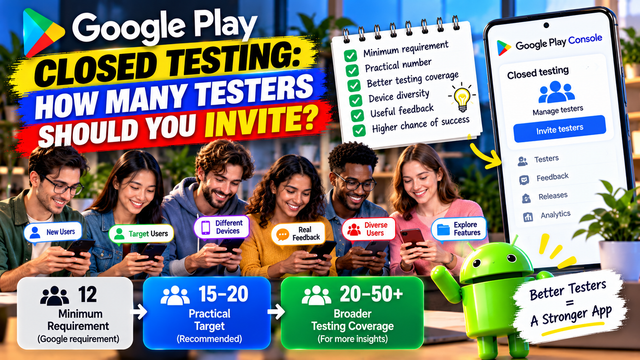
Learn how many testers you need for Google Play Closed Testing, why 12 is the minimum, how many testers you should realistically recruit, and how to build a reliable testing group.
One of the first questions developers ask when preparing a Google Play Closed Test is simple:
“How many testers do I actually need?”
The short answer is at least 12 testers for eligible new personal developer accounts.
But if you're planning your testing campaign around exactly 12 people, there's a small problem: humans are unreliable. Someone forgets to opt in, uses the wrong Google account, becomes unavailable, or simply disappears into the mysterious void where unfinished app testing goes.
A better strategy is to understand the difference between the minimum number required and the number you should realistically recruit.
The Official Google Play Requirement
For personal developer accounts created after November 13, 2023, Google requires developers to run a Closed Test before applying for Production Access.
At the time of applying:
At least 12 testers must be opted in.
Those testers must have remained continuously opted in for at least 14 days.
Meeting these conditions makes you eligible to apply for Production Access.
It does not guarantee that Google will approve Production Access.
Google also evaluates the quality of the testing information you provide, including tester engagement, feature usage, feedback, and your app's production readiness.
So the important distinction is:
12 testers is the minimum requirement, not necessarily the ideal recruitment target.
So, How Many Testers Should You Invite?
A practical approach is to recruit more than 12 people.
For example:
Recruitment Target
Practical Situation
12 testers
Absolute minimum
13–15 testers
Small buffer
15–20 testers
Safer practical target
20+ testers
Useful for broader testing coverage
50+ testers
May make sense for apps needing broader user diversity
There is no Google rule saying you must recruit 15, 20, or 50 testers.
These are strategy recommendations, not additional Google requirements.
The official requirement remains at least 12 continuously opted-in testers for the preceding 14 days for eligible personal accounts.
Why You Shouldn't Stop at Exactly 12
Imagine you recruit exactly 12 testers.
On Day 1, everything looks perfect.
Then:
One tester forgets to opt in.
One uses a different Google account.
One leaves the testing program.
One becomes unavailable.
Another tester never properly joins the closed test.
Suddenly, your carefully calculated number is no longer so impressive.
Recruiting a few additional testers gives you a practical buffer.
For example:
Recruit 15 → Aim for 12+ continuously opted-in testers.
That doesn't mean the extra three automatically replace any tester or extend the official requirement. It simply gives you more room to manage normal drop-off and participation problems.
12 Testers vs. 12 Good Testers
Here's where things become more important.
There is a difference between:
12 testers who are technically present
and
12 testers who provide useful testing coverage.
Google's guidance asks developers to give testers clear instructions, specify the feedback they want, encourage them to use as many features as possible, and provide a clear feedback channel. Testers must also remain opted in continuously for at least 14 days.
Consider these two groups.
Group A
12 people:
Opted in
Installed the app
Rarely explored it
Provided almost no feedback
Never tested important features
Group B
12 people:
Opted in
Explored the core user journey
Tested important features
Reported problems
Provided specific feedback
Helped verify improvements
Both groups contain 12 testers.
But Group B gives you much more useful evidence about whether the app is ready for production.
Should You Invite 20 Testers?
For many solo developers, 15–20 testers is a sensible recruitment target.
Not because Google requires 20.
It doesn't.
The advantage is simply that a larger pool can provide:
A buffer against tester drop-off
More device diversity
More user perspectives
More opportunities to discover bugs
More varied feedback
Better coverage of different user scenarios
For a small app with a clearly defined audience, 15–20 carefully selected testers may be more valuable than 100 random people.
More testers aren't automatically better.
More relevant testers are better.
What If You Invite 50 or 100 Testers?
You can recruit a much larger group if your testing strategy benefits from it.
Google's Play Console supports closed-test tester lists managed by email, and Google also supports Google Groups for managing access. The official documentation states that email-based tester lists can contain up to 2,000 users, with up to 200 lists and up to 50 lists per track. Additional closed tracks can also use Google Groups, which have no size limits stated in the documentation.
But don't confuse technical capacity with testing strategy.
If you invite 100 people and have no way to organize their feedback, you haven't created a sophisticated testing program.
You've created 100 notifications.
Choose Tester Quality Over Raw Numbers
Suppose you're launching a meditation app.
Would you rather have:
Option A: 30 random people who barely open the app
or
Option B: 15 people who regularly use meditation or wellness apps, test the main features, and provide detailed feedback?
Option B could produce much more useful information.
Your testers should ideally represent different parts of your expected audience.
For example:
New users
Experienced users
Different Android devices
Different levels of technical experience
Different network conditions
Different usage patterns
Users who match your target audience
This helps you discover problems that you may never encounter while testing the app yourself.
Don't Count Internal Testers Toward Your Closed-Test Strategy
Another common source of confusion is mixing testing tracks.
Google describes internal testing as a separate testing track, designed for quickly distributing builds to a limited group. Closed testing is a separate track where you choose a targeted group of testers.
If you're working toward the Closed Testing requirement, make sure the testers are actually participating in the closed testing track.
Don't assume:
“They installed my app, so they must count.”
Testing track, opt-in status, and the actual closed-test setup matter.
Make Sure Testers Actually Opt In
Adding someone's email address to your tester list isn't the same thing as having that person successfully opted into the test.
For closed testing, Google lets developers manage testers through email lists or Google Groups and provides an opt-in process. If you're using a Google Group, users need to join the group before opting into the test.
Your onboarding process should therefore look something like:
Add tester → Share correct opt-in information → Tester opts in → Tester accesses test → Tester installs test version → Tester participates
Don't stop at the first step.
A Better Recruitment Formula
For a typical solo developer, a useful approach is:
Step 1: Define the minimum
12 testers
That's the official threshold for eligible personal accounts.
Step 2: Add a buffer
Recruit approximately:
15–20 testers
This gives you some breathing room.
Step 3: Prioritize relevance
Make sure the group contains people who resemble your target users.
Step 4: Add device diversity
Where relevant, include different:
Android devices
Screen sizes
Android versions
Performance levels
Step 5: Prepare testing instructions
Tell testers exactly what you want them to test and how to report issues.
Step 6: Monitor the test
Track:
Opt-in status
Tester participation
Features tested
Feedback received
Problems discovered
Fixes made
Retesting completed
Step 7: Keep testing after the minimum is reached
Reaching 12 testers doesn't mean you should immediately stop paying attention to the app.
The purpose of the Closed Test is to learn whether the app is actually ready.
How Many Testers Should Different Apps Have?
There isn't one perfect number for every application.
Here's a practical framework:
App Type
Suggested Tester Strategy
Simple utility app
12–15 relevant testers
Personal productivity app
15–20 testers
Fitness/wellness app
15–25 testers
Social/community app
20–50+ testers
Shopping/e-commerce app
20–50 testers
Complex business app
15–30 carefully selected testers
App with many device-dependent features
Larger and more diverse group
These ranges are testing strategy recommendations, not Google requirements.
The official threshold for eligible personal developer accounts remains 12 continuously opted-in testers for 14 days.
What Should Your Testers Actually Do?
Recruiting 20 people isn't enough if nobody knows what they're supposed to test.
Give testers a clear mission.
For example:
Core Journey
Ask them to test:
Installation
Signup or login
Main feature
Secondary features
Settings
Notifications
Logout
Re-entry into the app
Feature Testing
Ask testers to explore important features rather than simply opening the home screen.
Real-World Testing
Encourage them to use the app in realistic conditions.
Feedback
Ask:
What worked?
What was confusing?
What failed?
What felt slow?
What feature was difficult to find?
What would you change?
Google specifically recommends clear testing instructions, feedback expectations, broad feature usage, and a clear feedback channel.
Don't Ask Testers to Pretend
This is important.
Don't tell testers:
“Just install it and keep it installed for 14 days.”
That turns the test into a checkbox exercise.
Instead, ask them to genuinely use the application.
If something doesn't work, you want to know.
If the onboarding is confusing, you want to know.
If a feature is difficult to find, you want to know.
A tester saying “This doesn't make sense” may be more valuable than ten people saying “Looks good.”
What Happens If You Have Exactly 12 Testers?
You can meet the numerical requirement if those testers satisfy the continuous opt-in requirement.
But you should still focus on engagement and feedback.
Google's Production Access process asks about:
How you recruited testers
How testers engaged with the app
Whether testers used the available features
Whether usage reflected expected production behavior
What feedback you received
What changes you made
How you determined the app was ready
So don't build your entire testing strategy around this sentence:
“I have 12 testers.”
Instead, build it around:
“I have evidence that my app was genuinely tested and improved.”
That's a much stronger position.
What If Testers Drop Below 12?
This is one reason a recruitment buffer can be useful.
If you begin with 15 testers and three become unavailable, you may still have 12.
If you begin with exactly 12 and three drop out, you have a problem.
The safest approach is to monitor your tester status throughout the testing period rather than assuming everything will remain unchanged.
If you notice a problem, address it early.
Don't wait until Day 14 and discover that your carefully constructed testing campaign has quietly collapsed while you were celebrating the calendar.
Should You Recruit Testers From a Testing Service?
A testing service can help organize tester recruitment and coordination, but the quality of the testing still matters.
If you use a third-party testing platform, focus on whether it provides:
Real testers
Appropriate devices
Genuine app usage
Useful feedback
Clear testing records
Reliable communication
Transparent processes
No testing service can guarantee Google Play Production Access.
Google makes the final decision based on its review process and your application's testing and production-readiness information.
For developers who need help coordinating Android testing, platforms such as inTesters offer tester-management and closed-testing services. Treat such services as a way to organize genuine testing, not as a shortcut around Google's requirements.
Recommended Tester Numbers at a Glance
If you want the simple answer:
Minimum
12 testers
Required for eligible new personal developer accounts.
Practical target
15–20 testers
Provides a useful buffer and allows more testing diversity.
Broader testing
20–50+ testers
Useful when your application has a broad audience, many features, or significant device diversity.
Very large test
50–100+ testers
Makes sense only when you have a clear process for managing participation and feedback.
Remember:
Google's requirement is 12. Your testing strategy can be larger.
Final Pre-Test Checklist
Before launching your Closed Test, check:
You understand whether the 12-tester requirement applies to your account
You have at least 12 suitable testers
You have recruited a few additional testers if possible
Testers match your target audience
You have considered device diversity
Testers know how to opt in
Testers are using the correct Google accounts
Your closed testing release is available
You have shared the correct testing/opt-in information
Testers know what features to test
You have a clear feedback channel
You are tracking tester status
You are recording meaningful feedback
You are fixing important issues discovered during testing
You plan to keep testing throughout the 14-day period
FAQs
1.Is 12 the minimum number of testers?
Yes, for eligible personal developer accounts created after November 13, 2023, Google requires at least 12 testers to be continuously opted in for the preceding 14 days before applying for Production Access.
2.Should I invite exactly 12 testers?
You can, but recruiting a few more gives you a practical buffer if someone fails to opt in correctly, becomes unavailable, or drops out.
3.Does Google require 20 testers?
No. The current official requirement is 12 testers for the affected personal developer accounts. Recruiting 20 is a testing strategy recommendation, not an additional Google requirement.
4.Do more testers guarantee Production Access?
No.
More testers can provide broader testing coverage, but Production Access depends on Google's review of your testing and production readiness.
5.Do testers need to be my target users?
They don't all have to be, but including people who resemble your expected users can produce more relevant feedback.
6.Can I use Google Groups for Closed Testing?
Yes. Google Play supports managing closed-test access through Google Groups. Members of the specified group can join the test after joining the group.
7.Is installing the app enough?
Installation alone should not be treated as the goal of testing. Google encourages developers to provide instructions, have testers explore features, collect feedback, and evaluate tester engagement.
8.Should I keep testing after reaching 12 testers?
Yes. The purpose of Closed Testing is not merely to reach a number. Continue using tester feedback to identify issues, improve the app, and establish that it is ready for production.
Conclusion
If you're preparing a Google Play Closed Test, remember the distinction:
12 testers = minimum requirement.
15–20 testers = practical buffer.
Relevant, engaged testers = valuable testing.
Don't recruit 50 people just because a bigger number looks impressive.
And don't recruit exactly 12 random people just because Google displays the number 12.
Choose testers who can actually help you answer the most important question:
“Would this app be ready for real users?”
Build your testing group around that question.
Recruit carefully. Give testers clear instructions. Encourage meaningful feature usage. Collect useful feedback. Fix important problems. Re-test.
Then your 14-day Closed Test becomes more than a requirement.
It becomes the final reality check before you put your Android app in front of the world.
About the Author

Saksham Goyal
Expert software tester and contributor to the community. Passionate about AI, automation, and user experience.