
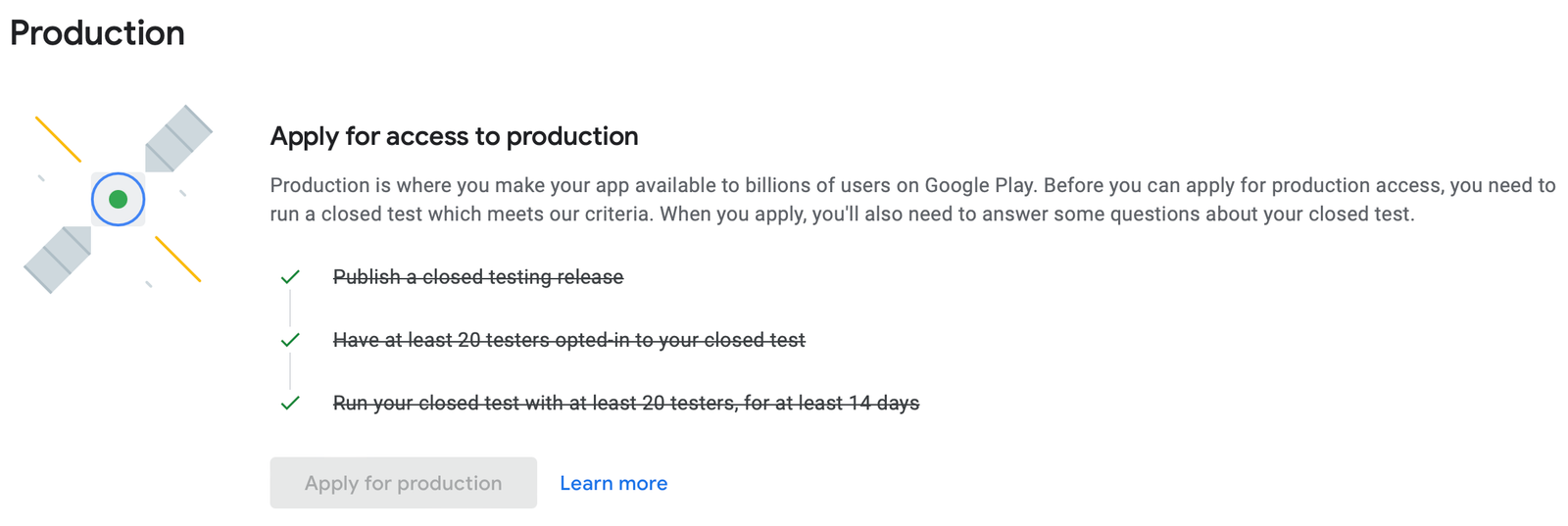
Securing production access on the Google Play Store can feel like navigating an obstacle course. If you registered a personal developer account, Google enforces a strict entry requirement: you must run a closed testing track with at least 12 testers who remain continuously opted-in for 14 consecutive days.
Simply getting 12 people to click a link isn't enough. Google tracks strict user engagement data. If your testers don't interact with your software correctly, your production application will be flatly rejected—forcing you to restart the entire 14-day clock from scratch.
To protect your launch timeline, you need high-quality testers. This ultimate guide details how to collect testers for Google Play Console production access, analyzes why casual acquisition methods fail, and breaks down why switching to professional testing is the smartest decision for your app.
The Spectrum of App Testers: From Friends to Professionals
Not all testers are created equal. When sourcing a testing pool, developers typically utilize one of three core groups:
1. Friends and Family
Many developers begin by inviting friends and family members to test their apps. While this approach is free and easy to set up, it often delivers inconsistent results.
Source: Personal contacts and close connections
Advantages:
No additional cost
Easy to invite and manage
Limitations:
Low engagement with the app
Testers may uninstall the app before the testing period ends
Limited feedback and testing coverage
Risk Level: High
Because friends and family usually aren't invested in the app's success, retention and testing quality can be unreliable.
2. Public Testing Communities
Platforms such as Reddit, Discord, Telegram, and Facebook groups offer tester-exchange communities where developers test each other's apps.
Source: Public app-testing communities
Advantages:
Can help quickly reach Google's tester requirements
Usually free or low-cost
Limitations:
High tester drop-off rates
Many users only install and briefly open the app
Feedback is often minimal or generic
Risk Level: High
Although popular among indie developers, community testing often fails to generate meaningful engagement data that demonstrates real user activity.
3. Professional Testing Services
Professional testing services provide managed testing programs with real users and real Android devices.
Source: Dedicated app testing platforms and professional tester networks
Advantages:
Consistent tester participation throughout the testing period
Real-device testing across multiple Android versions
Higher-quality feedback and bug reporting
Better compliance with Google Play requirements
Limitations:
Requires an investment
Risk Level: Very Low
For developers who want a smoother approval process and more reliable testing data, professional testing services typically offer the most dependable solution.
Why Community-Sourced Testers Cause App Rejections
When faced with the 12-tester requirement, the immediate instinct for most indie developers is to head straight to subreddits like r/12TestersIn12Hours, specialized Discord servers, or Facebook "sub4sub" styled app-testing groups.
While these communities are filled with well-meaning creators, relying on them introduces severe testing negligence that actively triggers Google's rejection algorithms:
The Inactive Ghost User: Community testers typically practice an "open and close" routine. They open your app for two seconds to trigger a log entry, then close it. Google tracks session duration; a steady stream of 3-second sessions flags the testing track as artificial.
The Sudden Uninstall: Internet strangers have zero loyalty to your project. If they need to clear storage space on day 9, they will uninstall your app. The moment your active tester baseline drops below 12, your 14-day streak breaks instantly.
Lack of Device Diversity: A handful of community members might install your app on identical emulator software or virtual devices. Google detects hardware fingerprints, testing on virtual environments instead of physical smartphones will result in a swift rejection.
The Strategic Solution: Switch to Professional Testing
Coordinating 12 to 15 real people to interact with a pre-release app every day for two weeks is a massive logistical distraction. If your time is valuable, struggling through community swap-groups is a highly inefficient strategy.
To eliminate the risk of a 14-day reset, smart developers utilize professional, paid testing services. A professional framework completely sanitizes your testing data to match exactly what Google’s manual reviewers look for.
What a Premium Professional Service Includes
When you invest in a professional closed testing package, you aren't just buying app installs—you are acquiring a fully managed QA compliance campaign. A high-tier service typically features:
1. Guaranteed 14-Day Testing Cycle
The service make sure the testing countdown runs just right, from day 1 to day 14 with no gap at all. The system watches the track kind of 24/7, so to verify that no technical hiccups pause the clock.
2. 12+ Vetted, Real-World Testers
While Google requires a minimum of 12 testers, most professional setups deploy a more robust safety buffer, like 20 or beyond testers. Each and every tester is a real individual using a unique physical Android device, that’s tied to a live Google account, and yeah this fully removes the emulator scenario from the equation.
3. Managed by an Expert "inTesters" Team
An enterprise-grade service is run by a dedicated management team, fully coordinated , so it almost never drifts. They make sure the testers actually open the app every day, then engage with the elements for at least 2–3 minutes per visit. After that they methodically tap through each layout and page to mimic this deep, organic kind of user behavior, like it’s naturally happening.
4. Comprehensive Device & OS Coverage Stats
Google wants to see that your application is stable across a wide matrix of hardware. Professional testing gives you clear diagnostic data showing performance across diverse Android versions (from Android 11 up to Android 14+) and major manufacturers (Samsung, Google Pixel, OnePlus, Xiaomi).
5. Detailed Bug Reports & Actionable Logs
True testing means finding flaws. Professional testers actively stress-test your UI, locate layout breaks, isolate crashes, and provide you with structured bug reports.
6. Google Play Compliance Check & Form Answers
At the end of the 14 days, you must answer Google's 10-question production access questionnaire. A professional service provides you with the exact technical logs, documented feedback summaries, and asset updates needed to fill out the form flawlessly—proving your testing compliance beyond doubt.
How to Set Up Your Console for Professional Testers
Once you partner with a professional testing team, onboarding them into your Google Play Console takes less than five minutes:
1.Create Your Track : Play Console Navigation.
Go to Testing > Closed testing on your sidebar and click Manage track.
2.Whitelist the Tester Emails/Paid Testers : Audience Integration.
Go to the Testers tab, then tap Create email list. Paste the Gmail addresses the professional testing team already vetted, and then go ahead and save the list.
3. Publish the Build - Release Rollout.
Upload the signed app bundle (.aab) into the track and hit Start rollout. After that, wait for Google’s internal review to flip the status over to Active.
4. Share the Web Link for Onboarding Launch.
Grab the “Join on the web” link from the very bottom of the Testers page, and send it to your testing coordinator. The professional team will take care of the opt-ins, and they’ll kick off the 14-day countdown.
About the Author

Pratyush Kumar Thakur
Expert software tester and contributor to the community. Passionate about AI, automation, and user experience.