
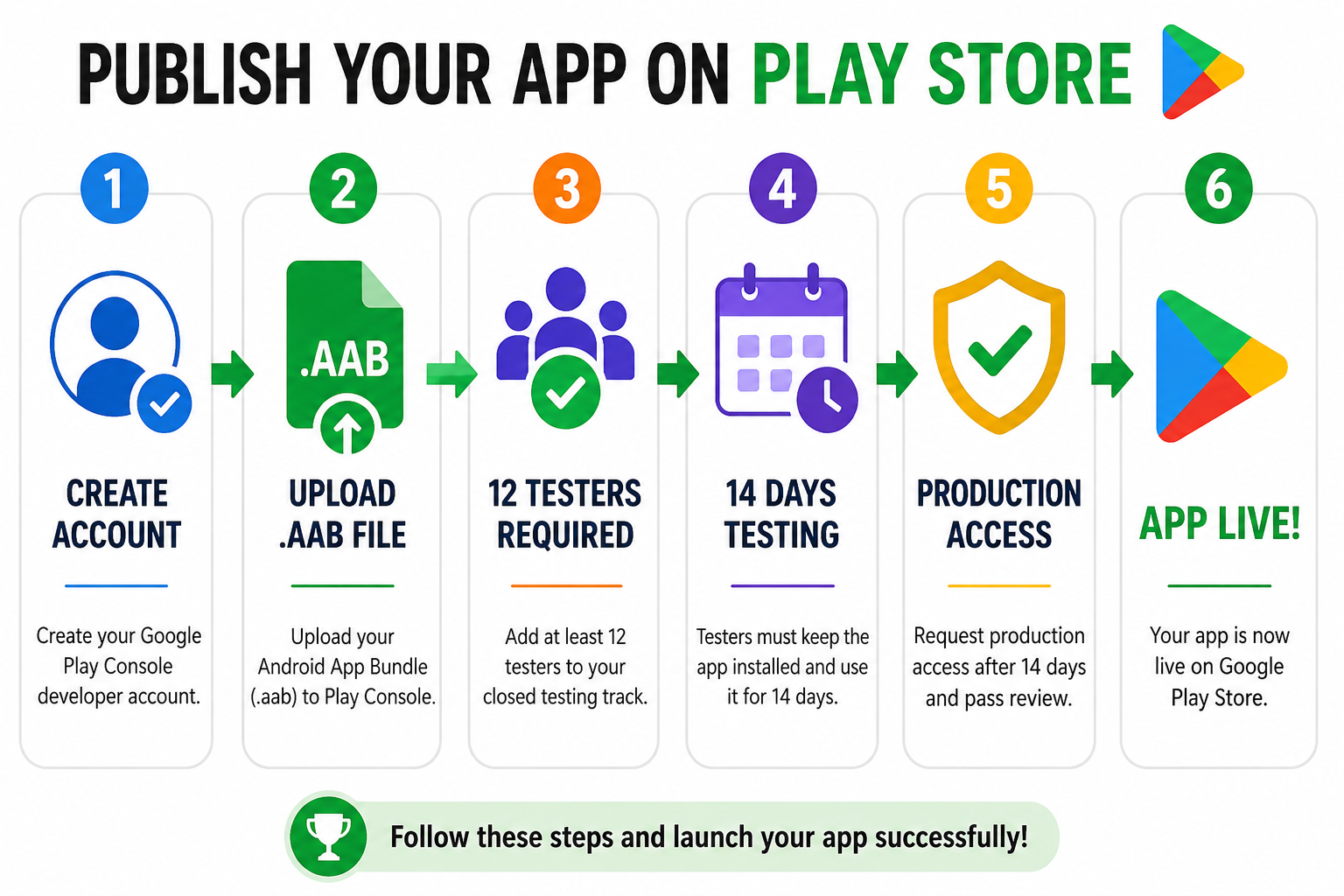
Getting your app listed on the Google Play Store puts it in front of a global audience of over 3 billion active users. However, the publishing landscape has changed completely. Google has introduced strict security frameworks, automated quality gates, and mandatory review tracks that you must navigate flawlessly to avoid app rejection.
This comprehensive, step-by-step blueprint covers everything you need to know about how to publish your application on the Play Store, mastering the Google Play Console, and effortlessly clearing the mandatory testing requirements.
1. What is the Google Play Console? (A Simple Analogy)
To publish an Android app, you cannot just email your code to Google. You must use a dedicated portal called the Google Play Console.
lets Understand it with simple Example - Think of the Google Play Store as a massive, high-end digital shopping mall. The Google Play Console is your landlord portal. It’s the backend dashboard where you sign the lease, set up your store displays, stock your digital shelves, track your daily sales data, and read feedback from your customers.
Without this dashboard, your app cannot exist inside the "mall."
2. Choosing Your Account Type: Personal vs. Organizational
Before you can register, you must choose between two distinct developer account setups. Google treats these very differently during the verification phase.
Personal Accounts
Best For: Solo developers, hobbyists, and independent creators.
The Registration Cost: A one-time fee of $25.
The Catch: Personal accounts created are subject to a mandatory 14-day closed testing rule before the app can ever go live to the public.
Organizational / Commercial Accounts
Best For: Registered businesses, startups, and corporate entities.
The Registration Cost: A one-time fee of $25 (requires official corporate documentation and a D-U-N-S number).
The Advantage: Organizational accounts bypass the mandatory 14-day tester rule entirely and can apply to publish straight to production after the initial security check.
3. Preparing Your Publishing Assets: The Digital Storefront
To list your app, you must prepare your technical and visual assets. Google requires two primary components:
The Technical Asset: Android App Bundle (.aab)
You no longer upload old .apk files to the Play Store. Google mandates the Android App Bundle (.aab) format. When you upload an .aab, Google’s backend automatically customizes and fragments the download for each specific user's phone model. This keeps the initial download size incredibly small and fast.
The Marketing Asset: The Store Listing
Your store listing is your visual display window. To attract downloads, you need to compile a cohesive, professional suite of assets:
App Title & Description: Your title (up to 30 characters) and a keyword-optimized full description (up to 4,000 characters).
App Icon: A clean, high-resolution graphic exactly 512 x512 pixels in PNG format.
Feature Graphic: A bold, striking banner image exactly 1024x500 pixels that displays at the top of your store page.
Screenshots: A minimum of two high-quality device screenshots showing your app's core features in action.
4. Surviving Google’s Strict Policy Check
Google manually tests your app on real devices before approval. Failing any part of these checks triggers a "Broken Functionality" rejection and resets your timeline.
Every Button Must Work: All tabs, icons, and menus must execute their intended action. If a "Submit" or "Settings" button crashes the app, freezes the UI, or does nothing, it fails instantly.
No Coming Soon Toggles: Eliminate dead links, empty placeholders, and features hidden behind "Coming Soon" screens. Everything in the build must be 100% complete.
Provide Login Credentials: If your app requires an account, phone number, or OTP, you must provide working test credentials in the App Access settings. If the reviewer can't bypass the login screen, your app is rejected.
Data Safety & Privacy: You must explicitly declare every piece of user data collected (like email, location, or device IDs), state if it’s encrypted, and host a live Privacy Policy URL both in the console and inside the app.
COPPA (Under 13) Laws: If your app targets children, you cannot track precise locations or use non-certified, third-party ad networks.
5. The Biggest Roadblock: Clearing Mandatory Closed Testing
If you are running a Personal Developer Account, you cannot jump straight from uploading your app to launching it publicly. You must pass through the closed testing gauntlet.
[Upload .aab File] ➔ [Google Security Review] ➔ [Deploy to Closed Track] ➔ [12+ Active Testers Install] ➔ [14 Days Continuous Activity] ➔ [Production Access Approval]
The Non-Negotiable Requirements:
You must recruit a minimum of 12 verified testers.
Those testers must keep your app installed on their phones for 14 consecutive, uninterrupted days.
They must actively engage and interact with the application daily.
The Friend & Family Failure:
Many developers try to bypass this rule by getting 12 close friends to click the opt-in link, or trading installs on free Reddit and Discord forum swaps.
This almost always leads to a painful production rejection. Why? Because casual users practice an "open and close" routine. They open your app for two seconds and close it immediately. Google’s internal console telemetry tracks session lengths; a solid block of 3-second sessions flags your track as artificial, resetting your 14-day clock back to zero.
6. How to Complete Closed Testing Easily with Professional Testing
Coordinating a decentralized group of 15 people, tracking their daily usage metrics, and constantly reminding internet strangers not to delete your app for half a month is an exhausting administrative distraction.
If you want to protect your launch timeline and ensure your app transitions seamlessly from a closed track straight into production on your very first try, the most efficient strategy is to leverage a managed professional testing service.
Instead of dealing with unpredictable forum swaps, an enterprise framework ensures your app hits every single metric Google's reviewers look for.
What Premium Professional Testing Delivers:
Guaranteed 14-Day Compliance: Complete end-to-end monitoring to ensure your track parameters remain perfectly stable without data drops.
20+ Vetted, Real-Device Testers: Provides a reliable safety buffer over the mandatory minimum. Every tester uses a unique, physical Android phone tied to an active Google Play profile—completely eliminating emulators.
Deep Organic Engagement: Vetted testers actively play or interact with your application’s interface for a minimum of 2–3 minutes per session, thoroughly exploring layouts to generate clean user telemetry.
Detailed Technical Bug Reports: Structured feedback logs detailing performance across diverse Android OS builds, device models, and UI rendering states before your app hits the general public.
Production Access Questionnaire Support: Pre-mapped technical data summaries to help you confidently complete Google's strict 10-question production access application form with ease.
About the Author

Pratyush Kumar Thakur
Expert software tester and contributor to the community. Passionate about AI, automation, and user experience.