
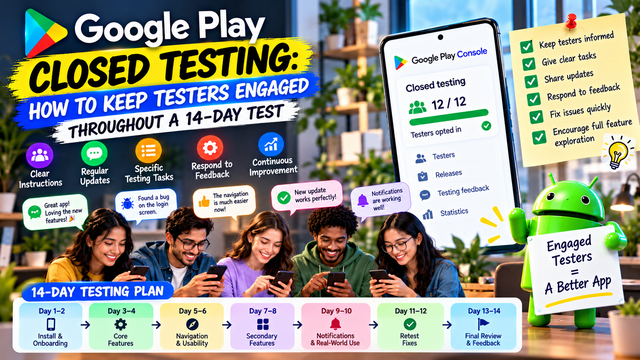
Keeping testers engaged throughout your 14-day Google Play Closed Test is about more than reaching the required tester count. Learn how to give clear instructions, assign focused testing tasks, collect useful feedback, fix issues, and keep testers involved throughout the entire testing process.
Getting 12 testers into your Google Play Closed Test is only the beginning.
For personal developer accounts created after November 13, 2023, Google requires at least 12 testers to remain continuously opted in for at least 14 days before you can apply for Production Access. But completing the 14-day requirement does not automatically guarantee approval. Google also asks about tester engagement, feature usage, expected user behavior, feedback, and the improvements you made during testing.
That means your goal should not be simply:
“Keep 12 people in the test for 14 days.”
It should be:
“Run a genuine testing process that produces useful feedback and improvements.”
Here is how to do that.
1. Start With the Right Testers
The easiest way to lose tester engagement is to recruit people who have no reason to care about your app.
Instead, choose testers who are reasonably close to your target audience.
For example:
A fitness app → people who regularly exercise
A finance app → people interested in budgeting or financial tracking
A meditation app → people who actually practice meditation
A productivity app → students, professionals, or people who use planning tools
A shopping app → users who regularly shop online
Relevant testers are more likely to explore the app naturally and provide meaningful feedback.
What to look for
Choose testers who:
Have compatible Android devices
Can follow testing instructions
Are willing to report problems
Can remain opted in for the testing period
Are genuinely interested in the type of app you built
Remember: 12 random installs are not the same as 12 useful testers.
2. Give Testers Clear Instructions
Don't send someone an opt-in link followed by:
“Please test my app.”
That leaves testers wondering what exactly you expect them to do. Humans already have enough confusion without adding a software-testing scavenger hunt.
Google specifically recommends giving beta testers clear instructions, explaining what feedback you want, encouraging them to use as many features as possible, and providing a clear feedback channel.
Give testers a short testing brief containing:
What to test
Sign-up/login
Main features
Navigation
Search
Notifications
Payments, if applicable
Settings
Profile/account management
Error handling
Logout
What to report
Crashes
Broken buttons
Confusing screens
Slow loading
Missing information
Unexpected behavior
Difficult navigation
The clearer the assignment, the more useful the results.
3. Don't Make Every Day Feel Like Homework
You want genuine testing, not twelve people completing a daily attendance sheet like they're back in school.
Instead of asking testers to perform the exact same action every day, divide testing into different areas.
For example:
Testing Stage
Main Focus
Days 1–2
Installation, onboarding, login
Days 3–4
Core features
Days 5–6
Navigation and usability
Days 7–8
Secondary features
Days 9–10
Notifications and background behavior
Days 11–12
Edge cases and error handling
Days 13–14
Final user journey and regression testing
This gives testers a reason to explore different parts of the application.
4. Create Small Testing Tasks
Large instructions are easy to ignore.
Instead, give testers small, specific assignments.
For example:
Task 1
Create an account and complete the onboarding process.
Task 2
Use the primary feature and report anything confusing.
Task 3
Try the app using a different network connection.
Task 4
Explore the settings and notification options.
Task 5
Complete the main user journey from beginning to end.
This makes testing easier and gives you more structured feedback.
5. Use a Simple Communication Channel
Google recommends providing a clear feedback channel such as email, a website, messaging forum, or private feedback through Google Play.
You can use:
WhatsApp
Telegram
Slack
Discord
Email
Google Forms
An in-app feedback system
For a small testing group, a dedicated messaging group can be particularly useful.
Keep communication focused.
Instead of:
“Any updates?”
Try:
“Today, please test the login and onboarding flow. Let us know if you experience any errors, confusing steps, or unexpected behavior.”
Specific questions produce better answers.
6. Send Short, Useful Reminders
Your testers are volunteers, not employees sitting in a testing department waiting for your next Jira ticket.
Send short reminders at sensible intervals.
For example:
Day 2:
“Please complete the onboarding flow and let us know if anything is confusing.”
Day 5:
“Today we're focusing on the app's main feature. Please try it normally and report any issues.”
Day 8:
“Please explore the settings and notification features and share anything that doesn't work as expected.”
Day 11:
“Please complete the main user journey from start to finish and report any remaining issues.”
Day 14:
“Final testing day. Please check the latest version and report any remaining problems.”
Avoid flooding the group with daily messages that simply say:
“Please test app.”
That quickly becomes digital wallpaper.
7. Encourage Testers to Explore the Whole App
Google's Production Access questionnaire specifically asks whether testers used the available features and whether their usage matched expected production behavior.
So don't limit testing to the homepage.
Create a feature checklist.
Example
Sign up
Login
Password recovery
Home screen
Search
Main feature
Notifications
Profile
Settings
Payments
Logout
Not every app will have every feature, obviously. Your app isn't required to contain a payment system just because humanity has collectively decided that every screen needs a checkout button.
The important thing is to test the features that actually exist.
8. Track Feedback as It Arrives
Don't wait until Day 14 to remember what your testers told you.
Google recommends maintaining a record of received feedback and reviewing it regularly to identify recurring themes and prioritize improvements.
Create a simple tracking sheet:
Tester
Feature
Issue
Severity
Status
Tester 1
Login
OTP delayed
High
Fixed
Tester 2
Search
Results slow
Medium
Investigating
Tester 3
Profile
Button unclear
Low
Improved
This gives you an evidence-based view of your test.
More importantly, it makes your Production Access answers much easier to prepare later.
9. Respond to Tester Feedback
Tester engagement isn't only about receiving messages.
Show testers that their feedback matters.
If someone reports a problem:
Acknowledge it.
Investigate it.
Fix it if necessary.
Ask the tester to retest.
Record the result.
For example:
“Thanks for reporting the login issue. We've identified the problem and included a fix in the latest test build. Please try logging in again and let us know if the issue is resolved.”
This creates a feedback loop:
Test → Report → Fix → Retest
That is far more valuable than collecting dozens of comments and doing nothing with them.
Google explicitly recommends responding to feedback and resolving identified bugs throughout the testing period.
10. Keep Testers Informed When You Release Updates
If you release a new build, tell testers what changed.
For example:
Version 1.0.3
Fixed login issue
Improved loading speed
Updated notification handling
Improved profile navigation
Then ask testers to specifically verify those areas.
This turns each update into another testing opportunity.
It also helps you understand whether your fixes actually solved the reported problems.
11. Don't Confuse Opt-In With Engagement
This is one of the most important distinctions.
Google's official requirement is that the required testers remain continuously opted in for at least 14 days. Google also evaluates tester engagement when reviewing Production Access.
However, Google's official documentation does not state that every tester must open the app every single day as a universal hard requirement.
So avoid misleading instructions such as:
“Google requires everyone to open the app for 2 minutes every day.”
That isn't stated as a universal official rule.
Instead, encourage genuine, meaningful use throughout the testing period.
Your objective is quality testing, not manufacturing activity just to make a dashboard look busy.
12. Maintain a Backup Group
If you invite exactly 12 testers, you have no room for problems.
Someone may:
Change phones
Lose access to their Google account
Forget to remain opted in
Stop participating
Become unavailable
Encounter installation problems
A practical approach is to recruit more than the minimum.
For example:
12 required → 15–20 practical testing pool
The extra testers are a buffer, not an additional Google requirement.
Google's official minimum remains 12 continuously opted-in testers for the preceding 14 days for eligible personal accounts.
13. Watch Your Tester Status
Don't assume everything is fine because your testers joined on Day 1.
Check your Play Console throughout the testing period.
Pay attention to:
Tester opt-in status
Test availability
Feedback
App version
Reported issues
Important changes to the testing track
Google also provides a Testing Feedback section under:
Monitor and improve → Ratings and reviews → Testing feedback
You can filter feedback by criteria such as date, language, app version, and device type.
A Practical 14-Day Tester Engagement Plan
Here's a simple structure you can use.
Days 1–2: First Experience
Ask testers to:
Install the app
Complete onboarding
Create an account
Explore the main screen
Report first impressions
Goal: Find installation and onboarding problems.
Days 3–5: Core Features
Ask testers to:
Use the primary features
Complete normal user journeys
Try different options
Report bugs or confusing interactions
Goal: Validate the core experience.
Days 6–8: Deeper Exploration
Ask testers to:
Explore secondary features
Test settings
Check notifications
Try different navigation paths
Goal: Find problems outside the main flow.
Days 9–11: Real-World Scenarios
Ask testers to use the app as they normally would.
Test:
Different network conditions
Different devices
Longer sessions
Returning users
Interrupted sessions
Goal: Discover issues that controlled testing may miss.
Days 12–13: Regression Testing
After fixing reported issues, ask testers to verify them again.
Goal: Confirm that fixes actually work.
Day 14: Final Review
Ask testers to:
Use the latest version
Complete the main user journey
Check important features
Report remaining problems
Then review your testing records before applying for Production Access.
What to Record During the 14 Days
Keep a simple testing log containing:
Tester Information
Tester identifier
Device model
Android version
Opt-in status
Testing Activity
Features tested
Scenarios completed
Problems reported
Feedback received
Development Changes
Bug discovered
Fix implemented
Version updated
Retest completed
Final Results
Major issues resolved
Remaining known issues
Improvements made
Overall production readiness
This information can become extremely useful when completing Google's Production Access questionnaire.
What Google Wants to Know After Testing
When applying for Production Access, Google asks about your closed test, including:
How you recruited testers
How testers engaged with the app
Whether they used available features
Whether their usage matched expected production behavior
What feedback you received
How you collected that feedback
Google also asks what changes you made based on the test and how you determined that the app was ready for production.
That's why your testing process should create a clear story:
Testers joined → Features were tested → Problems were identified → Feedback was collected → Issues were fixed → Fixes were retested → App became production-ready
That is much stronger than:
“12 testers installed the app and everything was fine.”
Common Tester Engagement Mistakes
Mistake 1: Recruiting Anyone With a Gmail Account
A Google account alone doesn't make someone a useful tester.
Mistake 2: Giving No Testing Instructions
If testers don't know what to test, they'll probably test nothing.
Mistake 3: Sending Constant Reminders
Too many reminders become background noise.
Mistake 4: Ignoring Feedback
If testers repeatedly report the same problem and nothing changes, you're wasting the test.
Mistake 5: Testing Only One Feature
A successful homepage doesn't prove that the rest of the app works.
Mistake 6: Waiting Until Day 14 to Review Feedback
By then, you may have spent two weeks discovering problems you could have fixed on Day 3.
Mistake 7: Treating 14 Days as a Countdown Instead of a Testing Process
The purpose of the closed test is to improve the app before production, not merely to watch a number increase.
Should You Use a Managed Testing Service?
If recruiting and coordinating testers is becoming difficult, a dedicated testing platform can reduce the administrative work involved in organizing a closed test.
inTesters provides Android app testing services focused on Google Play Closed Testing, including tester coordination and managed testing options. These are the service's own offerings and do not guarantee Google's Production Access decision.
You can also explore their resources on getting 12 testers for 14 days if you need help organizing your testing pool.
The important thing is to use genuine testers and genuine testing activity. No service can replace Google's review process.
Final 14-Day Engagement Checklist
Before applying for Production Access, confirm that you have:
At least 12 testers continuously opted in for the required period
Given testers clear testing instructions
Defined the feedback you wanted
Provided a clear feedback channel
Tested important app features
Recorded tester feedback
Identified recurring issues
Fixed important bugs
Retested important fixes
Reviewed Testing Feedback in Play Console
Documented changes made during testing
Reviewed production readiness
Prepared honest, specific answers for the Production Access questionnaire
Conclusion
Keeping testers engaged for 14 days isn't about forcing people to open your app every morning like some bizarre digital attendance ritual.
It's about building a structured testing process where testers understand what to test, what to report, and why their feedback matters.
The strongest approach is:
Recruit the right testers → Give clear instructions → Assign focused testing tasks → Collect feedback → Fix issues → Retest → Document improvements → Prepare for Production Access.
For eligible personal developer accounts, the formal requirement remains at least 12 testers continuously opted in for 14 days. But the quality of your testing matters too, because Google asks about tester engagement, feature usage, feedback, and production readiness when you apply.
Don't spend 14 days merely waiting for the calendar to finish.
Use those 14 days to make the app genuinely better.
About the Author

Saksham Goyal
Expert software tester and contributor to the community. Passionate about AI, automation, and user experience.