
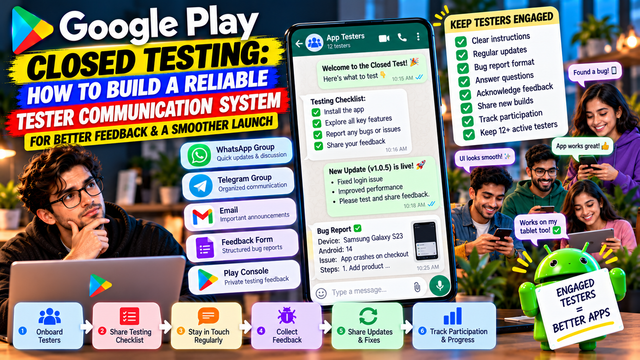
Learn how to build a reliable tester communication system for Google Play Closed Testing, including onboarding, feedback channels, bug reports, updates, reminders, and a 14-day communication plan.
Getting 12 testers into a Google Play Closed Test is only the beginning.
The harder part is keeping those testers informed, engaged, and able to report useful feedback throughout the testing period. A tester who receives an opt-in link and then disappears into the digital wilderness is not particularly helpful.
Google recommends giving testers clear testing instructions, explaining what feedback you want, encouraging them to use as many app features as possible, and providing a clear feedback channel.
A simple communication system can make this process much easier.
Why Tester Communication Matters
Closed testing is not just about collecting a specific number of testers.
You need to understand:
Whether testers can install the app successfully
Whether they understand what they are supposed to test
Whether they are actually using important features
What problems they encounter
Which issues are repeated
What improvements should be made before production
What changed after receiving tester feedback
For personal developer accounts created after November 13, 2023, Google currently requires at least 12 testers to remain continuously opted in for 14 days before applying for Production Access. Google also asks about tester engagement and feedback when you apply.
That makes communication part of the testing process, not an optional extra.
1. Create One Main Communication Channel
Do not scatter tester conversations across five different platforms.
Choose one primary channel such as:
WhatsApp group
Telegram group
Email
Discord
Slack
Dedicated feedback form
Private community/forum
Google itself recommends providing a clear feedback channel such as email, a website, or a messaging forum. Testers can also submit private feedback through Google Play.
Your testers should know exactly where to go when they find a problem.
Example
Primary testing group: WhatsApp
Bug reports: Google Form
Important announcements: WhatsApp
Detailed feedback: Google Play private feedback
This prevents important information from getting buried in casual conversation.
2. Send a Proper Welcome Message
The first message should answer the basic questions a tester is likely to have.
Tell them:
What the app does
Why they are testing it
Which Google Account they should use
Where to join the test
How to install the app
What they should test
Where to report problems
How long the test will run
What kind of feedback you need
Do not simply send:
"Install this app and test."
Humanity has apparently invented smartphones but still struggles with instructions.
A better onboarding message gives testers a clear path.
3. Give Testers a Simple Testing Checklist
Testers should not have to guess what to do.
Create a checklist covering the important areas of your app.
Example checklist
Area
What the tester should check
Signup
Can a new user create an account?
Login
Does login work correctly?
Navigation
Can users move between screens easily?
Main feature
Does the primary function work?
Payments
Do payment flows work correctly?
Notifications
Are notifications received properly?
Profile
Can users update their information?
Search
Are search results accurate?
Performance
Does the app feel slow or freeze?
Errors
Are error messages understandable?
Google recommends encouraging testers to use as many available features as possible so that testing produces more complete feedback.
4. Use Different Messages During the Test
Do not send one message on Day 1 and then disappear for 14 days.
Create a simple communication schedule.
Day 1: Welcome
Explain:
Installation
Opt-in
Basic features
Feedback process
Day 3: First Check-In
Ask:
Were you able to install the app?
Did you experience any crashes?
Which feature did you try first?
Day 5–7: Feature Testing
Ask testers to explore features they may not have used yet.
Day 8–10: Real-World Usage
Ask testers to use the app naturally and report anything confusing or inconvenient.
Day 11–13: Final Feedback
Ask testers to report remaining bugs and usability problems.
Day 14: Final Review
Collect:
Major issues
Minor issues
Feature feedback
Overall experience
Suggestions
This creates a communication rhythm without turning your tester group into a notification factory.
5. Ask Specific Questions
"Any feedback?"
is usually a terrible question.
It requires the tester to decide what matters, remember everything, and somehow produce a useful report from nothing.
Instead, ask focused questions.
Better questions
Was the signup process easy?
Did any screen take too long to load?
Did you experience a crash?
Which feature was confusing?
Did any button fail to respond?
Did the app behave differently on mobile data?
Was anything difficult to find?
Did notifications work correctly?
What would you improve first?
Specific questions generally produce more actionable feedback.
6. Create a Standard Bug Report Format
Make it easy for testers to report problems.
Ask them to provide:
Feature:
Problem:
Steps to reproduce:
Expected result:
Actual result:
Device:
Android version:
App version:
Screenshot/video:
Example
Feature: Login
Problem: Login button does not respond
Steps: Entered valid email and password → tapped Login
Expected: User should enter the dashboard
Actual: Nothing happens
Device: Samsung Galaxy A55
Android: 15
App version: 1.0.4
Now the developer has something useful instead of:
"Login not working."
That sentence belongs in a mystery novel, not a bug tracker.
7. Separate Bugs From Suggestions
Not every complaint is a bug.
Create categories such as:
Critical Bug
The app crashes or an important feature cannot be used.
Major Bug
A significant feature works incorrectly.
Minor Bug
A small problem that does not prevent normal use.
UX Issue
The feature works but is confusing or difficult to use.
Feature Suggestion
The tester wants something new.
General Feedback
Overall thoughts about the experience.
This makes it easier to prioritize fixes.
8. Keep Communication Two-Way
Do not use your tester group only for announcements.
A healthy communication system should allow testers to:
Ask questions
Report bugs
Clarify instructions
Share screenshots
Suggest improvements
Confirm that an issue has been fixed
If a tester reports a problem, acknowledge it.
For example:
"Thanks for reporting this. We have reproduced the issue and are investigating it."
This tells testers that their feedback is actually being used.
9. Tell Testers When a Bug Has Been Fixed
Suppose several testers report a login issue.
You fix it and upload a new build.
Tell them.
Example
New Test Build Available
We have released an updated version.
Fixed:
· Login issue
· Notification delay
· Profile loading problem
Please update the app and test these areas again.
This creates a valuable feedback loop:
Problem → Report → Fix → Update → Retest
That is much more useful than simply collecting complaints in a spreadsheet graveyard.
10. Maintain a Tester Communication Tracker
Create a simple spreadsheet.
Tester
Opted In
Device
Last Contact
Feedback
Issue Found
Retested
Tester 1
Yes
Samsung
Day 5
Received
Login
Yes
Tester 2
Yes
Pixel
Day 7
Received
None
Yes
Tester 3
Yes
OnePlus
Day 4
Pending
Payment
No
Tester 4
Yes
Xiaomi
Day 6
Received
UI
Yes
This helps you identify testers who need a reminder.
It also gives you a structured record of what happened during testing.
11. Avoid Spamming Testers
Communication is important.
Too much communication is also a problem.
Avoid sending:
Multiple unnecessary reminders every day
Repeated opt-in instructions
Messages that contain no new information
Long paragraphs nobody will read
Unrelated promotional messages
A useful communication schedule might be:
Day 1: Onboarding
Day 3: Installation check
Day 5: Feature testing
Day 8: Feedback check
Day 11: Retesting
Day 14: Final feedback
Adjust the schedule based on your app and tester group.
12. Use Google Play's Built-In Feedback
Google Play allows testers in open and closed tests to provide private feedback. Developers can review testing feedback in Play Console under:
Monitor and improve → Ratings and reviews → Testing feedback
Google also provides filters for things such as date, language, reply status, app version, and device type.
This can complement your own communication system.
You can therefore have:
Tester Group → Direct Feedback → Google Play Testing Feedback → Developer Review → Fixes → Retesting
13. Keep Testers Informed About Updates
Whenever you release a new test build, tell testers:
What changed
What was fixed
What they should test again
Whether any known issues remain
Where to report new problems
Example
Build 1.0.5
Please update and test:
Login
Profile editing
Push notifications
Payment flow
Known issue:
Some users may experience delayed notifications.
Please report any additional problems through the testing form.
This makes every new release an intentional testing cycle.
14. Create a Clear Escalation Process
Not every issue needs immediate developer attention.
Use a simple priority system.
P0: Critical
App crash, data loss, security issue, or complete feature failure.
P1: High
Important functionality is broken.
P2: Medium
Feature works but has a significant problem.
P3: Low
Minor UI or cosmetic issue.
This helps developers focus on the problems that actually threaten production readiness.
15. Keep Testers Opted In
For eligible new personal developer accounts, Google requires at least 12 testers to remain continuously opted in for the 14-day period before Production Access can be requested.
Therefore, tell testers clearly:
Please remain opted into the closed test throughout the testing period and do not leave the test unless instructed.
Communication cannot guarantee that testers will remain engaged, but it can prevent avoidable confusion.
16. Use Feedback to Improve the App
Communication is pointless if feedback goes into a black hole.
Create a simple workflow:
Collect → Categorize → Prioritize → Fix → Release → Retest → Record
For example:
Tester feedback: Checkout button sometimes fails.
Developer action: Reproduced the problem.
Fix: Updated checkout validation.
New build: Version 1.0.6.
Tester action: Retest checkout.
Result: Issue no longer reproduced.
That gives you an actual testing story instead of a pile of disconnected comments.
17. Connect Communication With Your Production Access Preparation
Google's Production Access application asks about tester engagement, whether testers used available features, whether their usage matched expected production behavior, how feedback was collected, and what changes were made based on testing.
Your communication records can therefore help you prepare accurate answers.
For example:
Question: How did you collect feedback?
Possible answer:
We collected feedback through a dedicated tester communication group, direct bug reports, and Google Play's private testing feedback. Testers were given feature-specific testing instructions and were asked to report bugs with device and app-version information.
Only use statements that accurately describe what you actually did. A beautiful testing story invented after the fact is still fiction.
18. A Simple Communication System You Can Copy
Here is a practical structure for a small development team.
Channel 1: Tester Group
Purpose:
Announcements
Testing instructions
Updates
Reminders
Channel 2: Feedback Form
Purpose:
Bug reports
Feature feedback
Screenshots
Device information
Channel 3: Play Console
Purpose:
Testing feedback
Tester management
Test releases
Testing status
Channel 4: Internal Tracker
Purpose:
Issue tracking
Tester status
Fixes
Retesting
The workflow becomes:
Tester → Communication Group → Feedback Form → Developer → Fix → New Build → Tester → Retest
Simple systems tend to survive. Complex systems tend to become abandoned monuments to human optimism.
19. 14-Day Communication Plan
Day
Communication Focus
Day 1
Welcome + installation + testing instructions
Day 2
Installation/opt-in confirmation
Day 3
First testing feedback
Day 4
Resolve early issues
Day 5
Feature-specific testing
Day 6
Device/performance feedback
Day 7
First-week review
Day 8
New feature or flow testing
Day 9
Bug follow-up
Day 10
Real-world usage
Day 11
Retest fixed issues
Day 12
UX and usability feedback
Day 13
Final issue collection
Day 14
Final feedback + testing summary
The exact schedule can vary. The important principle is consistency.
Common Tester Communication Mistakes
1. Sending only the opt-in link
Testers need context and instructions.
2. Asking for "any feedback"
Ask specific questions instead.
3. Not acknowledging bug reports
Testers may stop reporting problems if they feel ignored.
4. Sending too many messages
Communication should help testing, not bury it.
5. Not explaining updates
Testers need to know what changed and what should be retested.
6. Not recording feedback
Memory is not a database. Humanity learned this approximately five minutes after inventing spreadsheets.
7. Ignoring device information
Device and Android-version details can be extremely useful when reproducing issues.
8. Treating every suggestion as a bug
Separate defects, UX issues, and feature requests.
9. Losing track of testers
Maintain a simple tracker throughout the test.
10. Writing production-access answers without evidence
Your answers should reflect what actually happened during testing.
Final Tester Communication Checklist
Before starting your closed test, make sure you have:
One primary tester communication channel
Clear onboarding instructions
Correct opt-in link
Testing checklist
Feedback channel
Bug-report format
Tester tracker
Communication schedule
Update announcement format
Issue-priority system
Retesting process
Final feedback process
Record of important testing findings
Conclusion
A reliable tester communication system does not need to be complicated.
The goal is to make sure every tester knows:
What to do → What to test → Where to report → What happens next.
Google recommends clear tester instructions, defined feedback expectations, broad feature usage, and a clear feedback channel.
When communication is organized, developers can collect more useful feedback, identify problems faster, coordinate retesting, and prepare a more accurate picture of what happened during the closed test.
The best testing communication system is not the one with the most messages.
It is the one that turns tester activity into clear feedback, actionable fixes, and measurable improvements.
FAQs
1.How should I communicate with Google Play testers?
Use one primary communication channel such as email, WhatsApp, Telegram, Discord, or another messaging platform, combined with a structured feedback method. Google also supports private feedback through Google Play.
2.Should testers receive testing instructions?
Yes. Google recommends providing clear instructions about how to test the app, what feedback to provide, and encouraging testers to use as many features as possible.
3.How often should I message testers?
There is no official requirement for a specific number of messages. Use a practical schedule based on your app and testing needs rather than sending unnecessary daily reminders.
4.Can testers submit feedback through Google Play?
Yes. Testers in open and closed tests can provide private feedback through Google Play, and developers can review testing feedback in Play Console.
5.Does good communication guarantee Production Access?
No. Communication helps you run a better test and document genuine tester engagement, but it does not guarantee Production Access. Google evaluates the testing and production-readiness information you provide.
6.How many testers are required for the 14-day requirement?
For eligible new personal developer accounts, at least 12 testers must remain continuously opted in for the preceding 14 days before applying for Production Access.
About the Author

Saksham Goyal
Expert software tester and contributor to the community. Passionate about AI, automation, and user experience.