
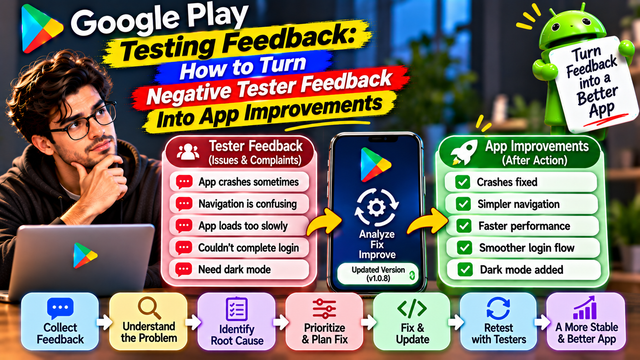
Learn how to turn negative Google Play tester feedback into app improvements. Discover how to identify root causes, prioritize bugs, fix issues, and retest your Android app.
Negative feedback is one of the most valuable things you can receive during Google Play Closed Testing. It helps you discover problems that may otherwise go unnoticed until real users start downloading your app.
A tester might complain about confusing navigation, slow loading, a failed login, missing features, or an unexpected error. Instead of ignoring the comment or immediately defending your app, use it to understand what is going wrong and decide what needs to improve.
The goal of closed testing is not to collect positive comments. It is to identify weaknesses, fix problems, and make your Android app more reliable before production.
In this guide, we will explain how to analyse negative tester feedback, identify the actual problem, prioritize improvements, and verify that your changes work.
1. Understand What Negative Feedback Is Telling You
Not every negative comment means your app is broken. Some comments reveal technical problems, while others highlight usability issues or personal preferences.
Start by understanding the type of feedback you have received.
Feedback type
Example
What it may indicate
Technical bug
App crashes after login
Functional or stability issue
Performance issue
Dashboard takes too long to load
Slow response or optimization problem
Usability issue
Users cannot find the profile section
Confusing navigation
Feature request
Please add dark mode
Potential future improvement
User preference
The button should be blue
Personal design preference
Compatibility issue
App does not work on my device
Device-specific problem
Why this matters: If you treat every negative comment as a critical bug, you may waste development time. First identify the underlying issue, then decide how to address it.
2. Read the Feedback Without Becoming Defensive
Developers often become attached to the apps they build. That is understandable, but it can make criticism difficult to accept.
For example, a tester might write:
The app is confusing.
I could not complete registration.
The homepage takes too long to open.
I could not find the payment option.
The navigation is difficult to understand.
Avoid dismissing these comments as user mistakes.
Instead, ask yourself:
What was the tester trying to accomplish?
At which point did the problem occur?
Was the expected action clear?
Could another user experience the same issue?
Does the problem prevent users from completing an important task?
Negative feedback is useful because it shows you how people experience your app outside your own development environment.
3. Identify the Root Cause Behind Every Complaint
A tester's comment describes their experience, but it may not explain the technical reason behind the problem.
For example:
Tester feedback: "I cannot log in to the application."
Possible causes include:
Incorrect authentication logic.
OTP verification failure.
Network connection problems.
Server response errors.
Incorrect error handling.
Confusing login instructions.
Do not immediately change the login screen just because a tester reported a login problem.
Investigate the issue first.
A practical root-cause process:
Read the complete feedback.
Identify the feature involved.
Ask the tester for the steps they followed.
Try to reproduce the same problem.
Check relevant error logs.
Identify the actual cause.
Decide on the appropriate fix.
The objective is to fix the reason behind the complaint, not just make the complaint disappear.
4. Look for Repeated Negative Feedback
One complaint may represent an individual experience. Multiple complaints about the same issue may indicate a larger problem.
For example:
Tester
Feedback
Possible pattern
Tester 1
Login takes too long
Login performance
Tester 2
OTP arrives late
Authentication delay
Tester 3
Login screen freezes
Login reliability
Tester 4
Unable to complete login
Authentication failure
These comments may point towards a common problem in the authentication flow.
Create a feedback tracker and group similar complaints together.
Useful categories include:
Login and registration
App crashes and errors
Navigation and user experience
Loading speed and performance
Notifications
Payments and transactions
Device compatibility
Missing or incomplete features
Repeated feedback deserves investigation because it may reveal a problem affecting more than one tester.
5. Prioritize Issues Based on Their Impact
Not every issue needs immediate attention. Developers should focus first on problems that affect essential app functionality, security, stability, or the user's ability to complete important tasks.
A simple priority system can help.
Priority
Issue
Recommended action
Critical
App crashes or users cannot log in
Fix immediately
High
Important feature does not work
Prioritize for the next update
Medium
Navigation is confusing
Improve the user experience
Low
Minor visual inconsistency
Schedule for refinement
Future
Optional feature request
Evaluate for a later release
Consider three questions when prioritizing:
How many testers are affected?
How seriously does the issue affect app functionality?
Does it prevent users from completing an important task?
For example, a crash during payment deserves more attention than a request to change the colour of a button.
6. Convert Negative Comments Into Actionable Tasks
General complaints are difficult to assign to developers. Convert them into specific tasks with clear expected outcomes.
Here are a few examples:
Negative feedback
Actionable development task
App is too slow
Investigate dashboard loading time and optimize the API response
Cannot log in
Review authentication, OTP, and error-handling logic
Buttons are confusing
Improve button labels and visual hierarchy
App crashes on opening
Reproduce the crash and investigate device logs
Cannot find settings
Improve navigation and make settings easier to locate
Notifications are not working
Check notification permissions and delivery logic
A good development task should explain:
What is happening?
Where does it happen?
How can the issue be reproduced?
What should happen instead?
How will the fix be verified?
This makes feedback easier to understand and act upon.
7. Ask Testers for More Details
Sometimes the initial feedback is too general to identify the problem.
For example:
Feedback: "The application is not working properly."
This does not provide enough information to investigate the issue.
Ask neutral follow-up questions:
Which screen were you using?
What action were you trying to perform?
What happened after you tapped the button?
Did you receive an error message?
Did the issue happen more than once?
Which Android device and version were you using?
You can also request a screenshot or screen recording when appropriate.
Avoid leading questions such as, "You didn't follow the instructions correctly, did you?"
The purpose is to understand the experience, not to prove the developer right.
8. Fix the Problem and Test the Updated Version
Once the development team identifies the root cause, implement the fix and verify it.
Do not assume that a successful code change means the issue is resolved.
Follow this process:
Reproduce the original issue.
Identify and fix the root cause.
Build an updated version of the application.
Install the updated version on a suitable device.
Repeat the steps that originally caused the problem.
Check whether the expected result now occurs.
Test related features to identify possible side effects.
Record the result.
For example, if testers report that registration fails after OTP verification, test the complete registration journey again, including OTP delivery, verification, account creation, and the first successful login.
A fix should improve the experience without breaking another part of the application.
9. Test the Fix Across Different Android Devices
A problem may not appear on every device.
Differences in Android versions, screen sizes, device manufacturers, memory, and network conditions can affect how an application behaves.
After making important changes, test the updated app on different devices where possible.
Pay attention to:
Different Android versions.
Different screen resolutions.
Samsung, OnePlus, Xiaomi, Pixel, and other device models.
Wi-Fi and mobile data.
Low-memory conditions.
Background and foreground behaviour.
Device-specific crashes or layout problems.
If the issue appears only on a particular device or Android version, document those details.
This helps developers identify compatibility problems instead of assuming that the application works correctly everywhere.
10. Keep a Record of Every Improvement
Maintain a structured record of feedback, development tasks, fixes, and retesting results.
A simple tracking sheet can look like this:
Date
Tester feedback
Issue category
Priority
Action taken
Status
Day 2
Login screen freezes
Technical bug
Critical
Authentication flow fixed
Retested
Day 4
Dashboard loads slowly
Performance
High
API response optimized
Retested
Day 6
Settings difficult to find
UX issue
Medium
Navigation updated
Verified
Day 8
Request for dark mode
Feature request
Low
Added to future roadmap
Pending
Recommended status labels:
New
Under Investigation
In Progress
Fixed
Ready for Retesting
Verified
Deferred
This record helps the team understand what was reported, what action was taken, and whether the problem was actually resolved.
It also gives you useful information when preparing your Google Play Production Access application.
11. Communicate Improvements to Your Testers
Testers should know that their feedback is being taken seriously.
When you release an updated version, share a short update explaining what has changed.
For example:
Before: "The app had login issues."
After: "We have improved the login process, fixed the OTP verification issue, and updated error messages to make account access easier."
You can also ask testers to repeat the earlier steps and confirm whether the issue has been resolved.
This creates a useful feedback cycle:
Report → Investigate → Fix → Update → Retest → Confirm
Remember that testers do not need to praise every update. Their honest observations are what help you improve the application.
12. Do Not Ignore Negative Feedback Before Production Access
Completing the required testing period does not automatically mean your application is ready for production.
For personal developer accounts created after November 13, 2023, Google requires at least 12 testers to remain continuously opted in for 14 days before applying for production access.
However, meeting this requirement is only one part of the process. Google also asks developers to explain how testers engaged with the app, summarize the feedback received, and describe the changes made based on testing.
Before applying, review:
Were important bugs identified and addressed?
Were recurring complaints investigated?
Were major usability issues improved?
Were important fixes tested again?
Is the app stable across relevant devices?
Can users complete the main app functions?
Can you explain the improvements made during testing?
Continue closed testing while resolving reported issues. An updated test release can help you verify improvements before production.
Do not manufacture positive feedback or hide genuine problems. Your testing report should accurately reflect what testers experienced and what your team changed.
13. Common Mistakes Developers Should Avoid
Mistake
Better approach
Ignoring negative comments
Review and classify every useful report
Blaming testers
Investigate their actual experience
Fixing symptoms instead of causes
Identify the root cause
Treating every complaint as critical
Prioritize based on impact
Making changes without retesting
Verify every important fix
Ignoring repeated complaints
Look for common patterns
Updating the app without tracking changes
Maintain a feedback and improvement log
Applying for production without reviewing major issues
Evaluate app readiness honestly
Avoiding these mistakes can make your testing process more organized and productive.
14. Practical Checklist: Turning Negative Feedback Into App Improvements
Use this checklist during your closed testing period.
Collect feedback from all available channels.
Review each negative comment carefully.
Classify feedback into bugs, UX issues, performance problems, and feature requests.
Identify repeated complaints.
Ask testers for additional details when necessary.
Reproduce reported issues.
Identify the root cause.
Assign priorities to important problems.
Convert complaints into actionable development tasks.
Fix critical and high-impact issues.
Upload an updated testing release when required.
Retest important fixes.
Verify changes across relevant devices.
Record completed improvements.
Prepare an honest summary of testing feedback and changes.
Conclusion
Negative tester feedback should not be treated as a setback. It is an opportunity to discover weaknesses before your application reaches a larger audience.
Every complaint can help you understand how users interact with your app, where they face difficulties, and which improvements will make the biggest difference.
The most effective developers do not simply collect feedback. They analyse it, identify the root cause, implement improvements, and verify the results.
Remember this simple principle:
Don't just collect negative feedback. Convert it into measurable improvements.
A successful closed test is not about proving that your app is perfect. It is about demonstrating that you listened, learned, and made your application better.
Frequently Asked Questions (FAQs)
1. Should developers be worried about negative feedback during Google Play Closed Testing?
No. Negative feedback is a normal part of testing. It helps identify technical problems, usability issues, and areas that need improvement before production.
2. Should every negative tester comment be fixed?
No. First classify the feedback. Critical bugs and problems affecting essential functionality should receive priority. Personal preferences and optional feature requests can be evaluated separately.
3. How should developers handle repeated negative feedback?
Group similar complaints, investigate the common cause, and prioritize the issue according to its impact. Repeated feedback may indicate a problem affecting multiple users.
4. Should developers update their app after receiving negative feedback?
When feedback identifies a genuine issue, developers should investigate it and release an update when necessary. They should then verify that the problem has been resolved.
5. How can developers document improvements during closed testing?
Maintain a feedback tracker containing the tester's comment, issue category, priority, action taken, app version, and retesting status.
6. Does negative feedback affect Google Play Production Access?
Negative feedback itself is not a reason for automatic rejection. Google asks developers to summarize feedback and explain changes made based on testing. Addressing genuine problems helps demonstrate that the app has been evaluated and improved.
7. Can testers provide feedback privately during closed testing?
Yes. Testers can provide private feedback through Google Play during closed testing. Developers can also provide a direct feedback channel, such as email, a website, or a messaging forum.
About the Author

Saksham Goyal
Expert software tester and contributor to the community. Passionate about AI, automation, and user experience.