
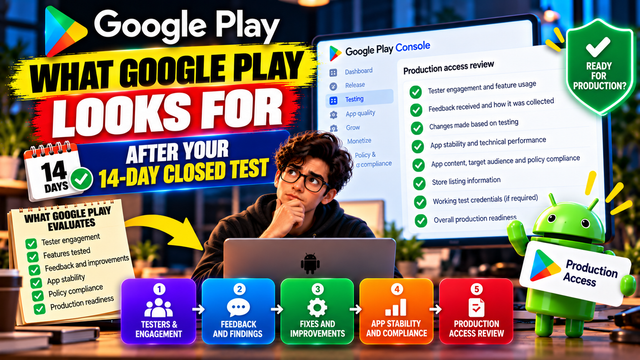
Learn what Google Play evaluates after the 14-day Closed Test, including tester engagement, feedback, app readiness, Production Access answers, and common mistakes.
You finally made it through the 14-day Google Play Closed Testing period.
Twelve testers have opted in. The calendar has moved forward. You have resisted the temptation to refresh Play Console every five minutes.
Now comes the part many developers underestimate: Production Access.
Completing the 14-day Closed Test does not automatically mean your app is ready for production. For eligible personal developer accounts, Google requires at least 12 testers to remain continuously opted in for at least 14 days before you can apply for Production Access. After that, Google reviews information about your testing process, app, and production readiness.
So, what exactly should you have ready after those 14 days?
1. Google Wants More Than a Completed 14-Day Timer
The 14-day period is a minimum testing requirement, not a guarantee of Production Access.
When you apply, Google asks questions designed to understand whether the app was genuinely tested and whether you believe it is ready for public users.
The Production Access application has three main sections:
About your closed test
About your app or game
About your production readiness
Your answers should reflect what actually happened during your test.
That means the real question after Day 14 is not:
"Did I complete 14 days?"
It is:
"What did I learn during those 14 days, and what did I do with that information?"
2. Tester Engagement Matters
Google asks about tester engagement during the Closed Test.
You may need to explain:
How testers were recruited
Whether testers used the available features
Whether their usage reflected expected production behavior
What differences you observed
What feedback you received
How you collected that feedback
Google specifically includes tester engagement and feature usage in the Production Access questionnaire.
This is why simply collecting 12 email addresses is a weak testing strategy.
Your testers should have had a genuine opportunity to use the app and identify problems.
Important clarification
Google's official documentation does not state that every tester must open the app every single day as a hard requirement.
What Google does explicitly emphasize is tester engagement and whether the app was properly tested.
So don't build your entire strategy around an invented "daily opening" rule. Build it around meaningful testing.
3. Be Ready to Explain What Testers Actually Tested
One of the most useful things you can prepare before applying is a simple testing summary.
For example:
Testing Area
What You Should Know
Onboarding
Was sign-up easy and functional?
Login
Were authentication flows working?
Core feature
Did testers successfully complete the main task?
Navigation
Were screens easy to move through?
Notifications
Did important notifications work correctly?
Payments
Were payment-related flows tested if applicable?
Search
Did search return expected results?
Performance
Were there slow screens or crashes?
Compatibility
Did the app behave properly across tested devices?
You do not need to invent problems just to make your testing sound impressive.
If everything worked correctly, say so.
But be specific about what was tested and how you determined it worked.
4. Google Wants to Know What You Learned
Your Closed Test should ideally produce some learning.
Maybe testers discovered:
A confusing onboarding screen
A broken navigation path
A crash on a particular device
A slow-loading screen
An unclear button label
A notification problem
An unexpected user-flow issue
The important part is what happened next.
For example:
Tester feedback: Users were unsure how to complete profile setup.
Developer action: Simplified the onboarding instructions.
Retest: Asked testers to repeat the setup process.
Result: Testers completed onboarding without additional confusion.
That is a much stronger testing story than:
"Testers tested the app and everything was fine."
5. Be Prepared to Explain How You Collected Feedback
Google asks you to summarize the feedback received and describe how it was collected.
Your feedback method could include:
Direct messages
Email
A feedback form
In-app feedback
A tester discussion group
Bug reports
Structured questionnaires
Keep a simple record of important observations.
For example:
Feedback
Action
Result
Login occasionally failed
Fixed authentication handling
Retested successfully
Search was confusing
Improved search UI
Better usability
App loaded slowly
Optimized API requests
Faster loading
Notification was delayed
Investigated notification logic
Issue resolved
This makes your Production Access answers much easier to write.
6. Show That You Acted on Important Problems
Google's guidance recommends continuing Closed Testing while resolving user-reported issues and bugs. It also recommends updating your app during testing before releasing to production when appropriate.
That creates an important development cycle:
Test → Discover → Fix → Retest → Improve
If testers found meaningful problems, don't simply record them and forget about them.
Prioritize the issues that could affect:
App functionality
User experience
Stability
Security
Core user journeys
Policy compliance
7. Review Your App's Production Readiness
The third section of the Production Access application focuses specifically on production readiness.
Google asks you to explain:
What changes you made based on your Closed Test
How you determined that the app was ready for production
This means you should have a clear reason for believing the app is ready.
For example:
"During testing, we identified issues with onboarding and image uploads. We corrected both issues and asked testers to repeat those workflows. We also reviewed app stability and confirmed that the primary user journey worked as expected. Based on these results, we determined that the app was ready for production."
That is much more useful than:
"The app is ready."
8. Check Your App for Technical Problems
Before applying, review the app itself rather than treating Production Access like a formality.
Google specifically highlights areas such as:
Broken functionality
Crashes
Missing screens
App content
Target audience
Content rating
Policy compliance
Working test credentials where authentication is required
If your app requires a login, make sure the credentials you provide to Google actually work.
Nothing says "production ready" quite like giving a reviewer a broken login and hoping for divine intervention.
9. Review Your Pre-Launch and Testing Results
Before production, review the technical information available in Play Console.
Look for issues involving:
Crashes
ANRs
Broken user flows
Device-specific problems
Performance
Compatibility
Login or navigation problems
The goal is not to achieve a magical dashboard containing zero warnings.
The goal is to understand which issues matter and resolve important problems before public release.
10. Your Production Access Answers Should Be Specific
One of the easiest mistakes is submitting vague answers.
Weak answer
"We asked our friends to test the app and everything worked."
Better answer
"We recruited testers from our intended user group and asked them to test the primary user journey and key features. During testing, we received feedback about onboarding and search functionality. We improved both areas and asked testers to repeat the affected workflows. We also reviewed app stability and usability before applying for production access."
The second answer tells Google:
Who tested
What they tested
What they found
What you changed
How you verified the changes
That is the story your testing period should produce.
11. Keep Your Testing Documentation Simple
You don't need a 200-page testing report.
A simple spreadsheet or document can contain:
Category
Information
Tester count
Number continuously opted in
Testing period
Start and completion dates
Features tested
Main features and workflows
Feedback
Important observations
Bugs
Problems discovered
Fixes
Changes made
Retesting
Verification after fixes
Stability
Crashes and major issues
Readiness
Final production checks
This documentation can help you answer the Production Access questionnaire accurately.
12. Don't Stop Testing Just Because Day 14 Is Over
Day 14 is not necessarily the end of testing.
Google states that if your app requires additional testing, you may need to continue your Closed Test. Reasons can include fewer than 12 opted-in testers or insufficient tester engagement.
So if your app is still being improved, keep testing.
A better mindset is:
Day 14 = minimum eligibility milestone
not:
Day 14 = guaranteed approval
That distinction can save you a considerable amount of frustration.
13. What If You Struggle to Maintain Reliable Testers?
Finding testers is often one of the hardest operational parts of the process, particularly for solo developers.
If you're manually coordinating testers through messages and spreadsheets, it can become difficult to track participation, feedback, and testing progress.
A dedicated testing platform such as inTesters provides Android app testing services built around Google Play Closed Testing, including tester coordination and managed testing options. These are inTesters' own services and should not be confused with Google's official Production Access decision.
You can also explore inTesters' Google Play testing resources for practical guidance on organizing the 12-tester testing process.
The important thing is still the same: your testing should be genuine, your app should be functional, and your Production Access answers should accurately describe what happened.
14. What Happens After You Apply?
Once you submit your Production Access application, Google reviews your submission.
Google says the review usually takes seven days or less, although it can occasionally take longer.
There are two broad possibilities:
Production Access Approved
You can proceed toward distributing your app through the Production track.
Additional Testing Required
Google may determine that more testing is needed.
If that happens, don't simply repeat the same testing strategy.
Review:
Tester engagement
Feature usage
Feedback collection
Bugs discovered
Changes made
App stability
Production questionnaire answers
Then improve the testing process before applying again.
15. Your Final 14-Day-to-Production Checklist
Before clicking Apply for Production, verify:
At least 12 testers have remained continuously opted in for the required period.
Testers had access to the actual Closed Testing release.
Important app features were tested.
Core user journeys were tested.
Tester feedback was collected.
Important issues were documented.
Relevant bugs were fixed.
Important fixes were retested.
App stability was reviewed.
Policy requirements were reviewed.
Store listing and app information are accurate.
Test credentials work if required.
Production Access answers are specific and honest.
You can explain what changed because of testing.
You can explain why the app is ready for production.
Frequently Asked Questions
1.Does completing 14 days guarantee Production Access?
No. The 12-testers/14-day requirement makes an eligible personal account able to apply for Production Access. Google still reviews the application and may require additional testing.
2.What does Google ask after the Closed Test?
The Production Access application covers your Closed Test, your app or game, and your production readiness. Questions include tester recruitment, engagement, feature usage, feedback, changes made from testing, and how you determined the app was ready.
3.Do testers have to open the app every day?
Google's official documentation does not state a universal daily-opening requirement. It does emphasize tester engagement and whether testers used the app and its available features.
4.What if Google asks for more testing?
Continue your Closed Test and improve the areas that may have been insufficient. Pay particular attention to tester engagement, feedback, bugs, and production readiness. Google explicitly notes that insufficient tester engagement can be a reason for continued testing.
5.Should I have exactly 12 testers?
You need at least 12 continuously opted-in testers for the published requirement. Operationally, having a few additional testers can provide a buffer against unexpected drop-offs, but the official requirement itself is 12.
6.Can a testing service guarantee Production Access?
No. A testing provider can help organize testing, testers, feedback, and reporting, but Google makes the Production Access decision.
Conclusion
The end of your 14-day Closed Test is not the finish line.
It is the point where Google expects you to demonstrate what your testing actually accomplished.
The strongest Production Access application tells a clear story:
We recruited testers → They tested the app → We collected feedback → We identified problems → We made improvements → We retested important changes → We evaluated production readiness.
If you can explain that process clearly and honestly, you are in a much stronger position than a developer who simply waited for Day 14 and clicked the application button.
For developers who want help managing the testing process, inTesters offers structured Android app testing options, including community and professional testing paths.
The 14-day countdown may be over. The quality check isn't. And honestly, that's probably the part worth doing properly.
About the Author

Saksham Goyal
Expert software tester and contributor to the community. Passionate about AI, automation, and user experience.